This contribution comes from Phillip Koo, the founder of Zen WP, a popular WordPress support company.
*************
“WordPress is awesome,” they said.
“It’s easy,” they said.
If you’re sitting there cursing “they” right now and about to throw your laptop across the room, I’ve been there.
To be fair, WordPress is an amazing platform. It features the most modern website functionality used in the market today such as email notifications, user management, indexing, and more.
But best of all, it’s free!
And because the platform is open-source, there’s an incredibly robust community building themes, plugins, and providing support.
What does all of this mean?
During the dot-com era, website technology was limited in that if you weren’t a developer or had any technical knowledge, you were limited to building static HTML websites through very elementary website builders.
Remember Angelfire?
Nick’s Notes: For me it was Frontpage 🙂
The good news is things are a lot different today thanks to WordPress.
Today, you can install a complete WordPress environment through a budget host for a couple of dollars and install a free plugin like “The Events Calendar” and immediately have a useable and complete calendar, event registration, and content management website in less than one hour and all without any knowledge of coding — something that would have taken months to build 20 years ago.
But there are a couple of caveats to all this, and WordPress can be immensely frustrating for new users.
Nick’s Notes: And even for veteran WP users too at times!
Table of Contents
1. The Steep WordPress Learning Curve
Though you can get out of the gates with some amazing modern technology in your new WordPress site, if you’re just getting your feet wet in the website development or management in general, you’ll probably have trouble answering questions like:
What are the best practices to managing user roles that I should follow?
How do I ensure that transactional emails get delivered to my customers?
How do I keep on top of security?
How do I stay in compliance with the law regarding transactions on my site (SSL, payment processors, etc.)?
These are questions that need to be answered if you intend on using your WordPress site for anything other than a personal blog.
Every Expert was Once a Beginner…
…but being a beginner in an expert’s world is discouraging.
This is where a lot of new WordPress users or website owners get overwhelmed and give up. They realize that they have to spend months learning various aspects of owning a website for their business before it’s truly operational.
Nick’s Notes: There’s a learning curve when using any new software. Although it’s getting easier to use and many themes are getting closer to true “drag-and-drop” functionality, it can be difficult to get your website to “cooperate” and behave and look how you’d like it to.
I’ve spent hours trying to explain to Google what I want done, pasting in someone else’s sample code from some forum thread, and crossing my fingers it does what I want without breaking the site.
So I get it when some tells me WordPress sucks!
Lately I’ve been trying to get better about just asking for help from companies like Phillip’s when I run into trouble. It saves me a ton of time and headache.
2. The Cluttered WordPress Ecosystem
Anything you can imagine can be built on WordPress.
At ZenWP‘s partner agency, Fluent, we’ve spoken with a lot of clients who’ve come to us asking for specific functionality that they need incorporated into their WordPress sites. And there’s never been a time we couldn’t think of a plugin or theme that provided what they needed out-of-the-box or an existing plugin that we could customize or build on.
Plugins for Days
But while this is on one hand the biggest advantage of building on WordPress, it can also be the cause of problems and frustration with your website.
It’s very common for new WordPress users to start downloading a variety of plugins as if they’re ordering off a menu.
Here’s the disturbing truth: you don’t have to be a vetted developer or even a competent one in order to build and distribute a theme or plugin throughout the WordPress community. Because of that there are a lot of plugins and themes you need to avoid.
Security Headaches
Granted, many of the plugins you’ll hear of or come across are going to be built by some great people who really understand WordPress and are experts in their fields. But many of them also lack the budgets to properly debug or properly test for security.
It’s the same reason why people who have given up on WordPress are quick to say that WordPress is not secure.
That’s not necessarily true. It’s not WordPress’ job to secure your site; that’s your responsibility. But it all comes from a lack of knowledge for which I don’t blame anyone.
Nick’s Notes: Ever had your site hacked? That’s a scary experience.
3. The Myth of the “Finished” WordPress Website
I mentioned our partner agency, Fluent, above. This is our full service digital agency where about 20% of our revenue comes from web development.
We work with businesses of all sizes from enterprise to sole proprietors, and we admittedly have trouble selling our monthly maintenance plans to our low-budget clients.
Are You Ever Really “Done”?
The truth is no website is truly ever “finished.” We can hand over the keys to a newly-developed site, but technology evolves and security requirements change over time.
Nick’s Notes: I make changes to my sites weekly. Sometimes it’s just adding content, sometimes it’s adding new functionality, sometimes it’s testing a different feature, but they’re in a constant state of evolution.
I consider a service like Phillip’s Zen WP to be “website insurance.” For a low monthly fee you’ve got someone on call should anything break or if you need to make any updates.
Compare it to your car. It probably costs about the same to insure, but is probably far more valuable to your business.
Making Sure Everything Plays Nice
In the WordPress world, when you have WordPress, a running theme, and 15 active plugins, what’s essentially happening is that you’re running 20 pieces of software together to make your website and you’re praying that everything works together flawlessly, which is almost never the case.
There’s always going to be plugins that go out of date and break functionality or incompatible plugins and themes, or new features you want to add.
When working with WordPress, you’ll have to fight the constant battle of updating plugins and themes, checking the site for functionality, addressing reports of bugs, replacing themes and plugins, etc.
It’s not WordPress’ fault nor is all of this unique to WordPress; it’s just the nature of open-source software and it’s the price you pay for flexibility and freedom.
So What Can You Do?
If you’re a business owner selling, say, scooters, and you want to create a website for your business, you probably don’t have time to figure all of this out. And if you’re a much smaller business, you probably don’t have the budget to hire a developer to work for you either.
Website Insurance
This is where WordPress support services like Zen WP or virtual assistants become very useful. They’re able fill this need at a budget that’s easier for micro businesses to work with.
Nick’s Notes: Most of these services cost less than $100 a month, which is a small price to pay for “website insurance” and to make sure you have a professional IT guy or girl on call should the need arise.
Your Turn and Next Steps
The response from the market has been tremendously positive. I think a lot of bloggers and businesses find it to be a relief and are happy to hire WordPress support companies to ensure that the digital face of their business continues to operate without having to lose sleep at night.
So if you’re frustrated with WordPress, don’t throw in the towel just yet. Because of the popularity of the platform, there’s a global network of affordable website assistants ready to help!
Twago is one of the largest platforms in Europe helping businesses all over the world find freelancers to help them with tasks and projects. The company has been in operation since 2009 and has grown a large marketplace for clients and freelancers to work together.
(The name, if you’re curious, comes from the phrase TeamWork Across Global Offices.)
Table of Contents
About Twago
The company’s head office is based in Germany. The freelancers using the platform are based all over the world, as are the customers. The company is run by founder, Thomas Jajeh. He is responsible for IT development, product management, and performance marketing at Twago. Hermann Hohenberger is responsible for affiliate marketing, sales, and support.
The platform makes it easy for businesses of all sizes to find experts matching the skill sets needed to complete their tasks. You can find support for all areas of your business, such as site design and development, writing services, sales and marketing support, mobile app design, translation services, and more.
Their target customers are entrepreneurs and start-ups, to large enterprises. The size of the business doesn’t matter; you fill in a few details about your job, budget, and the skill sets you’re looking for from the freelancer, and the platform does the rest to provide you with some potential freelancers.
Twago Intro Video
Services
As with most large marketplaces that allow you to post jobs and choose from the applicants that apply, there is a wide scope of services available. You’ll find programmers, designers, translators, marketers, and a whole host of other specialties.
If the work can be completed remotely there is a good chance you will find a freelancer to help. Because of the European focus, you may find more support for German, Italian, Spanish, and French-speaking assistants than on other freelance sites.
Plans and Pricing
Posting a project on the Twago platform is free. You only pay for the work that will be completed. Each project is evaluated on an individual basis, you add a budget to your project posting and this gives freelancers the opportunity to bid for the project based on your budget.
There are some optional extras to help your project posting stand out from the crowd, these are:
€149 ($170) – This hires you some assistance from Twago staff to make your project job the best it can be.
€49 ($55) – This fast-tracks your project so you receive offers within minutes.
€79 ($90) – Limit proposals from freelancers that sign your NDA.
€29 ($33) – Block your listing from search engines to limit it to just the Twago marketplace.
The site applies up-to-date SSL certificates on all monetary transactions making it safe and easy to send and receive payments.
Twago may not be the best fit for ongoing virtual assistant work. They explain that jobs on the platform “are generally limited in scope and duration and do not involve a traditional employer/employee relationship.”
Copify is a content marketplace where you can buy content for your site, press releases, ebook content, or any other needs from US and UK-based copywriters.
The company has been in business since 2010 and is based in the UK. They have the largest network of UK-based copywriters, and can handle orders within 48 hours.
Table of Contents
About Copify
The company is run by CEO Martin Harrison and co-founder Rob McVey, who are both directors of Copify. Martin looks after the marketing side of the business, along with recruitment and customer service, while Rob looks after the technical side of the business.
All of their copywriters work remotely across the United States and the UK. Your writing project will be assigned a “native” writer based on your preferred geography.
Copify’s services are aimed at digital marketing agencies and professionals in need of quality written content. Content is the driving force behind online promotion. It’s also one of the most time-consuming tasks behind running a blog/website.
Outsourcing written content to professionals who can turnaround your order quickly and optimize the content for SEO can save business owners a lot of time and money.
Copify Intro Video
Copify Services
Whatever your written content needs, Copify promises to deliver. Some of the more popular forms of content include:
Article writing
Blog posts
Press releases
Product reviews
Ecommerce content
SEO copywriting
One of the biggest struggles of online business is finding an audience of customers, and content marketing has emerged as the most popular way to do just that. But if you don’t have the time to craft compelling content yourself, hiring an outsourced service can get you in the game.
With Copify, you can order content on a one-off basis or in bulk and request changes to your order before accepting the work.
WordPress users can use a special plugin to import their content directly into their site with links and formatting intact, instead of having to copy and paste.
Plans and Pricing
Their pricing model is based on cost per word.
“Standard” copy costs £0.03 a word, and “Professional” copy costs £0.05 per word. At these rates, you will pay £15 and £25 respectively for a 500 word piece of content.
In the US, you’re looking at $30 for a 500 word blog post at the Professional level. (I actually couldn’t find the option for “Standard.”)
These prices are considerably higher than you would expect to pay from a “content mill” (see below), but theoretically reflective of the quality and experience of their copywriters, all of whom are native English speakers and go through some strict testing to be approved and join the team of freelancers working for Copify.
When you place an order, you select what type of content you need, describe your requirements such as the keywords to include or the tone to write in, and hit submit. A typical turnaround time is just 48 hours.
Copify Alternatives
While Copify’s rates are higher than what you might find at “content mill” sites like HireWriters and Textbroker (or Fiverr), they’re significantly lower than companies like Ellipsis, which charges up to $200 for a 500-word article.
Another service offering native English writing service is Copywriter Today, and they have an interesting subscription based model that could end up saving you money depending on your content demands.
Your Turn
Have you ordered content from Copify? If so, please leave a review below to help others with their decision.
Codementor is a software support company offering one-to-one support and mentorship to students, business owners, and aspiring developers looking to learn how to code — or just to get a quick answer to your coding question.
The company has been in operation since 2014. They are based in San Francisco and Taiwan, and they employ mentors all over the globe.
Table of Contents
About Codementor
The company is funded by Techstars, 500 Startups and other investors, and is headed up by CEO Weiting Liu. They provide a marketplace for coding experts to mentor anyone looking to learn more about coding.
Their mentors cover more than 800 topics and offer training and mentorship to beginners and advanced coders. Their mentors are based all over the world and connect with customers via screen sharing, video and text chat.
Their services are aimed at anyone interested in learning to code. Where the service applies to business owners is in getting real-time virtual support to resolve annoying website problems. It might not make sense to hire an in-house developer or post a job to Upwork for a small bug fix, but it still is a pressing issue.
Codementor Intro Video
Services
To connect with one of the mentors on the Codementor.io platform you need a PC or Mac. You can either make contact via on-screen chat, or if you have the ability to connect via video or audio call you can use these methods.
Codementor told me they typically respond to all requests within 10-30 minutes depending on the time of day and complexity of the request. Once one of their mentors has responded to your question you can open dialogue with them and discuss your requirements.
They’re not necessarily going to do the work for you — although I imagine the expert developers DO source some jobs from the platform — but more point you in the right direction on how you can solve the problem yourself. There are a number of times for this site where I could have used a service like this to fix one feature or make some small tweak to the design!
After a preview period you click “start paid session.” Your credit card will be billed at the end of the session. Using Zoom.us you can record your sessions to review again at a later date.
Plans and Pricing
Codementor provides an open marketplace for developers to set their own rates. Rates typically start at around $10-15 per 15 minutes and go up from there. Doesn’t that sound more affordable than $60 an hour?
There is a minimum charge for the first 15 minutes for each session, with the following time charged at the mentor’s rate per minute.
There is a money back guarantee in place. If you are not satisfied with your mentor within the first hour you can request a refund.
Codementor is also building out a gig marketplace similar to Fiverr or PeoplePerHour. These are fixed-price projects with a specific deliverable.
For example, when I looked under their mobile app development category, I found gigs ranging from $25 to $2000 and more:
Codementor Alternatives
Clarity.fm provides a similar one-on-one support marketplace allowing to you to connect with experts, but their focus isn’t as niche as Codementor.io.
For technical help like this, your options are pretty much to hire a developer on Upwork (or Fiverr for small jobs), or sign up for a recurring maintenance service like Zen WP.
Your Turn
Have you worked with a mentor on the Codementor platform? If so, please leave a review below to help others with their decision.
Baltic Assist is a virtual assistant company based in Lithuania. They are a relatively new company, starting operations in the beginning of 2015.
They currently supply services to Denmark, Norway, Sweden and Switzerland, but are open to serving clients throughout Europe and the rest of the world.
Table of Contents
About Baltic Assist
All of the company’s virtual assistants are based in Vilnius, Lithuania, and they are currently the only virtual assistant company in their area. The company is run by Andzej Rynkevic, a former employee at Barclays Bank and their MSc of Innovation and Technology Management.
Baltic Assist provides virtual assistance for entrepreneurs, professionals, and SME’s. If you are in a position where it makes financial sense to start outsourcing tasks, or you are in need of support so you can spend more time on other areas of your business, one of their virtual assistants are waiting to help.
They also specialize in providing financial services using the Cloud Accounting Systems. At just over a year old they are a relative newcomer to the virtual assistant space, the company is steadily growing and expanding their reach to more countries across Europe.
Services
Baltic Assist’s services are grouped into two different categories:
Virtual Assistance – Their VA’s can handle a wide range of day-to-day business tasks, such as administration, customer service, personal assistance, and more.
Full-Service Accounting – They have a team dedicated to handling business accounts. You can outsource your payroll, VAT returns, bookkeeping, payments, and more.
The first point of contact is to email Baltic Assist with an outline of the tasks you want to outsource. Their team will decide what kind of virtual assistance you need and discuss your workload to workout the best price.
When you have been assigned a virtual assistant you can chat with them on the phone or over skype to formally meet. From here on you communicate directly with your virtual assistant sending them all the information they need to complete the tasks and set deadlines.
Plans and Pricing
Baltic Assist has a handful of plans available. The first is for on-demand accounting help, which is billed out at €25 per hour.
On the virtual assistant side, you have a couple options. You can choose the pay-as-you-go model for €15 per hour, or you can sign up for a dedicated VA plan and enjoy some cost savings as well as some continuity in personnel.
The 10 hour per week / 40 hour per month Premium plan costs €480, or €12 per hour.
The full-time 160 hour per month Professional plan costs just €1600, or €10 per hour. Compared to rates for other European virtual assistants, these are quite affordable.
Baltic Assist Alternatives
For EU accounting expertise, Baltic Assist is an affordable and reputable provider. On the VA side of the equation, the rates are significantly lower than their more-established competitors such as Boldly or Time Etc.
Both of those companies are very highly rated for communication and quality of work.
Your Turn
Have you worked with Baltic Assist? If so, please take a moment to leave a review below to help others with their decision.
Ellipsis is a relative newcomer to the virtual assistant space with the company starting operations in January 2016. They are offer virtual writing services, enabling you to hire a personal writer to produce content for your blog or website, write compelling press-releases, or create written content for any other needs.
Table of Contents
About Ellipsis
Ellipsis is part of the Miles AG family of companies. (The most notable sister company in the VA space is the well-rated eaHELP.)
The company is headed up by CEO Bryan Miles and COO Shannon Miles, with Ivy Sprague as manager of operations. They are based in Atlanta, US, and employ only native English speakers also based in the US.
Their services are aimed at businesses that already have a marketing plan and strategy in place and need help with their written content. Quality content is at the forefront of Internet marketing, and Ellipsis’ staff can help you spread the word of your business through site content and marketing.
When asked what their areas of specialization were, Ivy explained, “We want to be the voice in your head…only better. We’ll write about anything, from accounting to Internet security.”
The kind of answer you would expect from a company that produces creative content, but paints a clear picture of their services.
Services
The company partners with leaders and communicators to create content that will make a difference to your business. Their writers will help spread the voice of your business to a much wider audience. Writing content is a time-consuming process, hiring a writer from Ellipsis Ink means you can free up some times to focus on other areas of your business.
If you find it hard to express your visions, strategies, or convey your business services in words, Ellipsis can help. Their writers produce blog posts, social media content, lead generation copy, email campaigns, eBooks, and more.
The company are keen to keep the content they provide in your own “voice.” They will call you to discuss your current content strategies, previous writers you may have used, what style of writing you want for your business, and aim to provide you with more than just a quote.
Ellipsis Intro Video
Plans and Pricing
The company prices on a flat-fee per project basis. They encourage month-to-month arrangements to ensure the relationship is working and both parties are happy.
They don’t give ballpark pricing estimates on their site, instead encouraging visitors to speak with a member of their team to get a personalized quote for your content requirements. You’ve probably come to learn, as I have, that that means it ain’t gonna be cheap.
In the video above, Ivy explained that a 500 word blog post could be in the $200 range.
BDHire is a virtual assistant company based in Chittagong, Bangladesh. The company was founded in 2008, and has since been providing virtual assistant services to clients and business owners worldwide.
Table of Contents
About BDHire
The company is headed up by Abul Kashem. Being in operation since 2008 makes BDHire one of the longer established companies in the fast-paced virtual assistant space.
Their target customers are social media and web design companies, travel, hotels and real estate businesses, as well as individual entrepreneurs and small business owners.
Looking at their in-house experts available for hire, they have a lot of services aimed at the smaller online entrepreneur. This was confirmed when I asked what their areas of specialization were, BDHire said, “full-time webmasters, link builders, SEO specialists, internet marketing experts, SBI webmasters and WordPress developers.”
Services
A lot of the company’s services are directed helping online business owners with their websites through the use of their virtual assistants. Their core services can be summarized as follows:
Link Building – They have a team of dedicated link builders, submitting articles and website URLs to directories and social bookmarking sites.
Keyword Research – They can find and provide a list of keywords in your chosen niche. As well as preparing a content creation blueprint.
On-Page SEO – They can analyze your existing content and ensure you are optimized for relevant keywords and your content is SEO friendly.
Niche Site Creation – BDHire have a team of experienced niche site builders. They can start a site for you either by choosing a niche or following your guidelines.
WordPress Services – Complete WordPress support, so you can invest your time in other areas of your business and leave the technical support to their experts.
SBI Services – Their experts will build a site from scratch or work on a site you already have. They can also move your site over to WordPress with a “smooth and successful transition.”
Plans and Pricing
Their rates vary per project and expert being hired.
Their minimum hourly rate is $17 per hour to give you a good idea of how much you will be paying and how they compare to other virtual assistant companies. BDHire representatives are happy to discuss each project’s individual needs and give you a more accurate quote.
In addition to rates that are 2-3x higher than their geographic neighbors, they also charge a one-time $250 set up fee, which is actually pretty uncommon in the industry.
BDHire Alternatives
What sets BDHire apart from general VA companies is their expertise in SEO, WordPress and niche sites. If you’re looking for support in these areas I would discuss you needs with them and get a quote.
If your needs are more varied or don’t require that type of specialization, you can probably save money by checking out competitors like My Tasker or VA Talks.
Your Turn
Have you worked with BDhire? If so, please leave a review below and share your experiences as it helps others with their decision.
Brickwork India is probably the most famous of all virtual assistant companies. Brickwork India was featured prominently and favorably in two bestselling books: Thomas Friedman’s The World is Flat, and Timothy Ferriss’ The 4-Hour Work Week.
Started as a 5 member start-up in 2005, Brickwork India today is 350 strong and caters to over 20,000 clients across 116 countries. They are India’s first ISO 27001: 2013 certified Virtual Assistance company.
Table of Contents
About Brickwork
The company is based in Bangalore, India, which has become a true technology hotbed – India’s Silicon Valley. From their modern facilities in Bangalore, Brickwork India has attracted customers ranging in size from busy sole proprietors to Fortune 500 companies.
Services
Brickwork India virtual assistants are diligent and focused professionals who can accomplish a wide variety of tasks, including everything from basic administrative work, to human resources, database management, and even social media marketing campaigns.
Because of India’s deep talent pool of educated workers, you can get well-qualified help that knows how to get the job done with little additional training.
The service menu consists of 3 main areas of service:
Admin Services: Here a team of executive assistants specialized in business support, accounting & taxation takes care of all your day-to-day routine back-office work, sales & marketing support, web based support, HR support, office management support, report generation, social media support, secretarial help, accounting and bookkeeping services, etc.
Knowledge Services: The team consists of highly qualified & experienced business analysts who are qualified MBA’s, CPA’s and Engineers, specializing in providing insights and solutions to clients through business research, investment research, procurement and sourcing services.
Technical Services: This team is populated with professionally qualified software engineers and graphic designers with expertise in a wide range of technologies offering technology assistance ranging from simple technical support to creative web and graphic designs, web applications, desktop and database applications, Ecommerce solutions, CRM & ERP solutions and Mobile apps.
Sponsored Link:
Brickwork India Intro Video
Plans and Pricing
Beyond the category of services needed, you also have the flexibility to choose from several engagement options:
subscription-based
retainer model
project-based
a la carte hourly
Subscription rates start around $15/hour, with dedicated assistant plans at the 40, 80, and 160 hour per month levels.
Rates improve with the more hours you buy. The time you buy does not rollover if you don’t end up keeping your virtual assistant busy, so it might be best to start at a lower amount.
For project-based tasks, Brickwork India will provide a bid specific to your tasks so you can compare with other options.
Brickwork India Alternatives
Make no mistake; their rates are higher than other virtual assistant companies in India. In fact, their hourly rates are higher than you might expect to pay for a local US high school or college-aged intern.
The difference is you get the well-known “brand name” of Brickwork, along with their infrastructure and security, and you don’t have to worry about additional payroll tax and employment filing requirements.
For a couple lower-priced alternatives in India, check out MyTasker or VMG BPO.
Your Turn
Have you worked with Brickwork? I encourage anyone who has used their services to rate and review their experience below.
Where’s the best place to hire a rockstar freelance virtual assistant?
Two of the largest platforms for online workers are Upwork and FreeeUp. Both of these sites have a deep talent pool and your diamond-in-the-rough virtual assistant is probably out there somewhere — it’s just a matter of finding them, or them finding you.
Note: This article focuses on the employer’s perspective. If you’re a freelancer looking for work, the information below will give you some insight into the hiring process, fees, and protections on each of the platforms, but doesn’t speak to how difficult securing work is or the types of clients you might encounter on either Upwork or FreeeUp.
Fordisclosure, links to FreeeUp are affiliate links.
Table of Contents
Intro to Upwork and FreeeUp
While the two platforms share some similarities, there are a few key differences you should know about.
Upwork is the love child of Elance and oDesk, two Silicon Valley startups that helped pioneer the virtual freelance marketplace model, starting back in the late 1990s.
When these one-time competitors combined forces in 2015, they rebranded as “Upwork” and created the world’s largest freelance marketplace, with more than 12 million registered freelancers.
FreeeUp is the newcomer, the upstart rookie in this fight. They burst onto the scene in 2015, and have grown quickly to become a leading contender when it comes to hiring freelancers.
What started as a site almost exclusively for e-commerce support (that’s where the extra “e” in the name comes from), FreeeUp has expanded into a broad range of available skills and only lets in the “top 1%” of freelancers who apply.
On both sites, you might be surprised at the breadth of skills and workers available for hire. If the role you’ve envisioned for your virtual assistant can be done remotely, you can find someone to do it on Upwork.
The site has several broad-strokes categories of remote work, including design and creative work, programming and development work, administrative support, marketing and sales work, and more. And of course beneath each of those are dozens of highly specialized areas of expertise.
For example, here are some of the skills listed under Sales and Marketing:
Once you click on any one of those skills, you’ll be presented with a pretty-looking grid of freelancers in that category. For example, when I click on SEO Specialists, this is what I see next:
These little profile previews will show you how many hours the freelancer has completed on Upwork, their hourly rate, where they’re located in the world, and an indicator of how well they’ve performed for past clients.
Once you create a free Upwork account, you can contact these professionals directly, or post your own job to see what kind of bids you get back.
Similarly, FreeeUp divides its workers into several high-level categories, with more specific skills under each of those.
For instance, you’ll find categories like:
Business Operations
eCommerce
Digital Marketing
Web Development
Under Digital Marketing, the unique subject matter areas of expertise are shown:
When you click on one of those skills, like SEO & Adwords Expert, for example, you’re taken to this page which invites you to create a free account, submit a worker request, and “get introduced to a [qualified] freelancer within hours.”
Unlike Upwork, FreeeUp doesn’t show you the names, faces, or rates of their workers before you sign-up, and you can’t reach out to freelancers directly to invite them to your project.
Both platforms have a number of “safeguards” in place to protect both workers and employers. In this section I’ll walk through those and why they’re important.
Ratings System
The hallmark of many peer-to-peer platforms is a two-sided rating system, in which buyers rate sellers and sellers rate buyers — popularized by ebay in the mid-90s.
Upwork has been building its rating system for more than a decade, and you can see the feedback each worker has received from past clients.
Because workers tend to be hired for shorter-term projects, there is a lot of client turnover, which amounts to plenty of opportunity to collect positive (or negative) feedback.
One thing to be aware of, beyond the cumulative 5-star score, is the number of jobs completed with no feedback given. Many employers (myself included sometimes) subscribe to your mom’s old adage of “if you don’t have anything nice to say, don’t say anything at all.”
(A $66 job still “in progress” from 2012 probably isn’t a good sign either.)
Upwork also shows you the “job success rate” of each freelancer, which measures the percentage of gigs they’ve done resulting in “a great client experience.” Naturally, the higher the percentage, the better.
Although I had a successful project with the developer shown, a 59% job success rate is pretty poor and I’d be hesitant to hire someone with that kind of track record.
On each freelancer’s profile page, you’ll also find a summary of their work history on the platform, which is meant to give you an indication of the “safety in numbers” of how many other people have hired them and how experienced they are.
In contrast, here’s an example of an excellent profile page. Her “in progress” jobs are hourly and have hundreds or thousands of hours completed, and she has a 99% job success rate:
Take all these metrics with a grain of salt. They’re here to help you with your hiring decision, but past performance is no guarantee of future results and every job is different. I’ve found great workers with almost no feedback or work history, and had horribly painful projects with contractors with glowing reviews.
On Upwork, freelancers also have the opportunity to review you, the employer. These metrics aren’t visible to you in aggregate, but you can view your client feedback on each contract.
When you post new jobs, potential candidates can see some of your employer metrics. For example, before people bid on your job or project, they’ll be able to see what previous hires said about you as well as how much money you’ve spent on the platform and the percentage of job postings you’ve made that have resulted in a hire.
These are designed to protect the freelancers; if you only hire for 1 out of every 5 job postings you make, it might not be worth their time to submit an application since your performance on the platform makes it look like you’re not that serious.
On the flip-side, if you’ve spent thousands of dollars on Upwork and each posting results in a hire, you’re a very attractive employer to apply with.
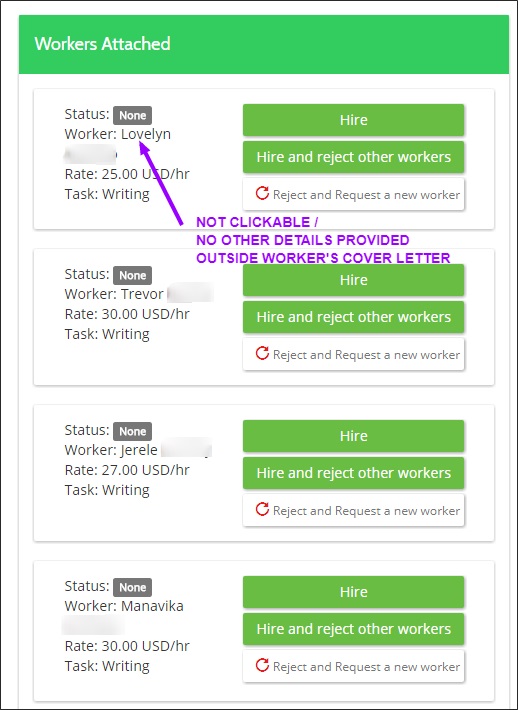
On FreeeUp, worker ratings and profiles are strangely non-existent.
Workers introduce themselves via an email cover letter, and they’re free to link to a portfolio or website of their own creation, but there’s no standard profile page on FreeeUp they can point to.
And unless workers have specifically collected testimonials and feedback from past clients (and included those in their self-created portfolio/website), there’s no rating system at all.
Where to see your applicants in one place? I found this under the “Ticket” tab in my account:
Here’s where the level of trust in FreeeUp’s “top 1%” pre-screening really comes into play. It’s like they’re saying, “Look, we’ve already done the vetting for you. Why are you stressing about it?”
They’re trying to make the process as seamless as possible by limiting the amount of information going into your decision, but part of me wanted a little more insight into who these people are!
Pro Tip: For quick, one-off, inexpensive projects, it probably isn’t a huge deal, but if you’re hiring for a long-term position on either platform, ask for references and actually call them.
Pre-Screening
Upwork historically has been a mostly open platform, allowing just about anyone to create a profile and begin bidding on work. Recently though, they’ve begun throttling that growth, at least in certain crowded categories, turning away freelancers where they already have enough supply.
Meanwhile, FreeeUp claims to only let the top 1% of applicants into their system. How does that work in practice?
Turns out, there is some science behind it, or at least a consistent process. They put every candidate through a 4-part interview process that was developed in part by founder and CEO Nathan Hirsch while hiring freelancers to help with his own booming e-commerce operation.
Step 1: Application
The first step is for workers to apply on FreeeUp.com. (Want to apply? Mention me, Nick Loper, to expedite your application.)
Workers submit a resume, portfolio, answer a few questions, and share some logistics information like their Internet speed and typing speed.
After that, the FreeeUp worker onboarding team makes a decision based off of strict marketplace standards if they will be given a skills interview.
Step 2: Skills Interview
The first FreeeUp interview (conducted over phone or Skype) is a skills interview. Candidates are expected to answer specific questions about their expertise and participate in role-playing scenarios to see how advanced their knowledge is.
Only those who can showcase “absolute expertise” make it through to the second segment of the interview.
Step 3: Attitude Interview
In this phase, workers are asked about how they solve problems, work with clients, and uphold strong communication.
I think this is an often over-looked segment of the hiring process, because I’ve seen firsthand how the most technically-proficient person isn’t always the best team member.
Step 4: FreeeUp Communication Guidelines
The fourth step is for the candidate to review and accept the FreeeUp Marketplace Guidelines and terms. In this 15-page rulebook is all the fine print about time off, emergencies, daily updates, using software, and communicating with clients.
Freelancer Tests and Self-Ratings
On FreeeUp, really on the tests on the front-end of the application process are the Internet Speed test and the typing speed test — not necessarily relevant to the skills you’re hiring for.
(Of course the “real” test is how well they can make their email cover letter stand out from the crowd.)
In contrast, Upwork gives workers a chance to beef up their profile by taking certain skills tests. For instance, here are the test scores of Marjorie, who we met above:
If you click on the Details link, it will show what specific subcategories were included on the test and how they performed on each of those.
As someone who was “an A-student” and a good test-taker in school, these tests and their results appeal to me as an employer, even though I know in real life I didn’t always make the best employee.
On Upwork, I might use these tests as a “tiebreaker” between two equally talented candidates, but wouldn’t necessarily rule someone out on the basis of their test result or their lack of taking the test in the first place.
Like some of the other metrics mentioned, it’s almost more of an indicator of how much effort they’re putting toward their online job search. Upwork gives them this extra opportunity to showcase their skills so it’s only natural the “hungriest” candidates will use that to their advantage.
Work Monitoring
Upwork provides a “Big Brother” work monitoring solution in the form of a screen capture software tool. They call this Work Diary, which takes screenshots of your virtual assistant’s screen at roughly 10 minute intervals while they’re on the clock.
On FreeeUp, workers are simply asked to “Punch In” to the system and “Punch Out” when they’re done with the project or done for the day. They’ll also be able to add notes of what they accomplished during that time, and Freeeup automatically bills clients the agreed-upon hourly rate each week.
You don’t get the “over the shoulder” screen view that you do with Upwork unless you ask your assistant to install another monitoring software like TimeProof from OnlineJobs.
In practice, you probably have better things to do than pore over these screenshots every day or every week, but they’re nice to have if you notice a dip in productivity or if things are just taking longer than you think they should.
Escrow Payments
Upwork offers escrow payments as a way to protect both you and the virtual assistant in the deal. For fixed-price projects, you’ll deposit the funds into an escrow account controlled by Upwork, and release payment to your freelancer when certain milestones are completed.
This shows the freelancer you’re serious about putting up the money and paying them, while still giving you some protection if they flake and don’t deliver the goods.
With FreeeUp, there’s no escrow payment option, but you’re paying hourly and on a weekly basis so there’s less risk for both parties.
Dispute Resolution
One advantage of Upwork is their dispute resolution service. With FreeeUp, they say they help resolve disputes and payment conflicts between workers and employers but don’t really detail what that process looks like.
However, on Upwork, if you and your freelancer can’t come to terms on a particular project or you think they may be fudging their hours, you can file a dispute through the Upwork platform.
A mediator will review both sides of the story and potentially help you get some of your money back or stop payment altogether. One thing to note though is the mediator isn’t necessarily going to be a judge of the quality of the work, especially for hourly jobs. Instead, they’ll look at the Work Diary logs and make a decision accordingly.
FreeeUp Replacement Guarantee
One advantage of FreeeUp is their worker replacement program. If your assistant quits, moves on, or just isn’t a great fit, they’ll quickly find you a new qualified VA from their bench — at no charge.
Of course you have any specific processes they need to be trained on, that’ll be on you, but at least you’re not back starting at square one.
What Happens After You Hire?
When you hire a virtual assistant through Upwork or FreeeUp, you pay them through the respective platforms, and the companies take a cut for facilitating the connection. See below for more information on pricing.
For project-based work on Upwork, it’s standard to pre-pay a portion of the total project into an escrow account. With FreeeUp, that doesn’t seem to be the case. Instead, you’ll get an invoice (and be automatically billed) each week for the hours your VA has worked.
My Interview with FreeeUp Founder Nathan Hirsch
Advantages of Upwork
Wide global talent pool, and more control over the recruiting/screening process.
Robust freelancer profiles and ratings.
No upfront costs.
Best for one-off projects or super-specialized support.
Advantages of FreeeUp
Pre-screened workers — the “top 1%”.
Quick and easy to hire.
No upfront costs. (Other companies charge $500 to present you w/ a handful of “pre-screened VA candidates.)
Better for ongoing hires or e-commerce work.
Pricing Comparison
Both sites represent huge talent pools, and earn money by playing matchmaker by taking a fee on every payment processed through their system.
Upwork makes the bulk of its money by charging a fee on every project completed on its site. This fee ranges from 5-20%, depending on how much work (in dollars) a particular freelancer has done for you. This fee is baked into the price you pay, but comes out of your virtual assistant’s pocket.
Theoretically, they pass that cost on to you, the employee.
For instance, if you sign on for a $1000 engagement, the first $500 will have a 20% Upwork platform fee, netting the freelancer $400, and the next $500 will carry a 10% platform fee, leaving them with $450. In total, they’d earn $850 and Upwork would earn $150.
This graduated pricing structure makes sense, as it rewards Upwork early on in the relationship for making the connection, and rewards the freelancer with lower rates for continuing to run work through the platform (vs. “going rogue” and taking the relationship offline).
On top of your $1000 payment, Upwork will charge you 2.75% as a payment processing fee.
FreeeUp works similarly, taking a flat 15% fee (or a minimum of $2) on every hour worked. That means if you hire a worker at $20 an hour, they’re really pocketing $17.
Although this fee is somewhat invisible on the client side, it’s theoretically getting passed on to you in the quoted hourly rate from your freelancer.
If you really have a long-term hire in mind AND don’t mind doing more of the upfront screening/legwork, you’ll save money on a platform like OnlineJobs.ph (the largest job board in the Philippines).
They charge a $49/mo fee to post jobs and communicate with candidates, which you can cancel once you’ve made your hire, and after that you just pay them directly with no one else taking a percentage.
My Experience w/ Upwork
My most successful Upwork project hire was actually for the late-2012 redesign of this site. If you go to the Wayback Machine and check out the old version you’ll get an appreciation for how big an improvement it was.
The developer was awesome – super responsive on Skype, hammered out the changes really fast for what I thought was a very good price.
I re-hired him later for another small project, which was also very well done, but when I needed something else done a few months after that, I couldn’t find him. He’d disappeared. Poof.
I’ve also used Upwork for some low-cost web research, which was OK, but nothing like mind-blowingly amazing or anything.
For ongoing work, some of my best hires have come from Upwork (actually back when it was Elance). Even though it’s primarily a project-based platform, I found a couple long-term hires that worked out really well for almost full-time employment, including one virtual assistant I ended up working with for more than 2 years.
On the flip-side, I’ve also been burned for north of $10,000 on this platform for web development projects that never got fully completed. It was an incredibly painful, stressful, and expensive experience I wouldn’t wish on anyone.
In the first case, the dispute resolution safeguards didn’t apply because I foolishly agreed to work with the developer “off-platform.” In the second case, we agreed to end the contract after a few of the milestones were met (albeit not on time) but technical incompetence prevented the development company from finishing the job. It sucked.
Note: To check out what other users have to say, check out the other reviews here.
My Experience w/ FreeeUp
After reading the positive feedback on FreeeUp and starting to see the platform gain some traction on this site, I decided I better give it a shot myself.
If you’ve attempted to hire on any other platform that doesn’t pre-screen candidates, you have an immediate appreciation for the potential time-savings of FreeeUp’s “top 1%” promise.
One of my biggest hangups right out of the gate with FreeeUp is you’ll notice (at press time at least) it’s a very minimum-viable-product-style interface. Though comparing it with the robustness of Upwork is perhaps a little unfair since the two platforms have different aims — and Upwork has at least a 15-year head start.
Still, I was somewhat frustrated by the lack of worker profiles and feedback on the site, to the point I asked Nathan about it. His response was that they want to build a 5-star platform. If someone sucks, they get kicked off, he said.
To find out how the system worked and if FreeeUp could deliver on the promise of pre-vetted 5-star workers, I posted 3 jobs — roles I was actually looking to hire for — to see what came back.
The first was for a writing position and this was the one that generated the most matches. The hourly rates ranged from $18-30 an hour, which I thought was fair, but a couple of the cover letters stood out with the most relevant experience and writing style.
I hired the guy that looked like the best fit and gave him a couple articles to tackle. I provided him with:
the proposed title
a rough outline of where I wanted him to go
a target word count
The articles came back both totally passable, but my control-freakness got the best of me and I heavily edited the second one. I should know better after dozens of attempts to outsource writing over the years that I have a hard time signing my name to something that’s clearly not in my voice.
In the end, the content was just fine, I edited, formatted, and added images to make them look nice for the blog. Because of FreeeUp’s hourly billing, they ended up costing around $60-70 each, which I thought was fair for articles in the 1500-2000 word range. It would be a great value if you’re not as picky as me!
I’ll probably use the guy again for similar projects in the future.
The next job posting was a dud. I was looking for someone with experience in creating awesome looking graphics specifically for Pinterest. I got only a couple applications, both with pretty weak cover letters, and no Pinterest-specific examples in the portfolio.
I’m sure they were talented graphic designers yes, but I didn’t feel like taking a chance on somebody who’d never done the exact thing I was looking for before. Hourly rates for that one were $12-19/hour.
The 3rd job was maybe the most interesting. I was looking for a dedicated Pinterest marketing specialist and actually got a couple really well-qualified candidates right away. I had a call with one and she was speaking my language, all up until I asked for an estimate or quote to manage my account on a monthly retainer basis.
She couldn’t tell me, and instead pointed to the quoted rate of $35/hr inside of FreeeUp. I was like OK, so how many hours do you think it would take? And she wouldn’t say, so we kind of just awkwardly left it there.
The other quote actually was for a monthly retainer, but it was $470 a month, which was over my budget.
In the end, there does appear to be a method to the 1% pre-vetting claim, as only one of the candidates was an immediate no-go in my book (a writer with 2 typos in the first line of her cover letter … oops!).
Compared to the percentage of candidates that immediately get round-filed on OnlineJobs for example, FreeeUp did a great job of weeding those out.
The other thing to note is that I found the rates generally a little higher than other platforms, which probably makes sense because if the people really are the top 1%, they probably expect to earn more too.
Note: To check out what other users have to say, check out the other reviews here.
Which Should You Choose?
For project work where you need a specific niche skill or a wider talent pool, probably Upwork.
For faster hires for smaller projects or ongoing work, or something specific to e-commerce probably FreeeUp.
Your Turn
What do you think? When hiring virtual assistants, do you prefer to work through Upwork or FreeeUp? Or another platform entirely?
Neyox is a virtual assistant company based in New Delhi, India. The company was founded in 2010, and have since matched up thousands of customers across the globe with virtual assistants to help with their businesses.
Table of Contents
About Neyox
The company is headed-up and run by Neeraj Parnami. They have a team of virtual assistants all based in New Delhi. They operate with a project manager supervising projects, so you have a point of contact above the virtual assistant if necessary.
Neyox list their target customers as, IT and ITES companies, law firms, doctors, accounting firms, web design and social media companies, real estate companies, and travel companies. If you don’t fall into any of those categories, don’t let that put you off contacting them.
There is often a good deal of negotiating space with virtual assistant companies, and only after explaining your business and your own requirements can you gauge how well-matched the relationship is going to be.
Neyox has a number of guiding principles. One that stood out to me was, “At Neyox, customer satisfaction is essential to our success. We always first understand the customer’s requirement and deliver it flawlessly to achieve complete customer.”
It’s always reassuring to hear companies saying all the right things.
Neyox Intro Video
Services
In-line with most virtual assistant companies, Neyox covers a wide range of tasks that their virtual assistants are capable of taking on. They list IT and software consulting as their area of specialization, but have a long list of skills on their website, including:
administration
writing
marketing
online research
graphic design
social media
mobile app development
and much more.
Their virtual assistants are available from 20 hours a month upwards. There are no additional fees, just a flat rate per pricing plan. Each task you submit is overseen by a line manager, and you will have updates reported back to you.
To get the most out of the relationship with a virtual assistant company you need to be as detailed as possible with your requirements. Communication is key to the mutual success of you as the customer, and the company.
Plans and Pricing
Neyox has four different price plans.
They start with a Trial Pack, which costs $240 for 20 hours of virtual assistant time in the month. This works out at $12 per hr, with no extra fees added on.
Their Economy Plan works out at $10 per/hr with an upfront cost of $400 for 40 hours.
Their Standard Plan is $9 per/hr with a cost of $720 for 80 hours, and finally they offer an Executive Plan at a total cost of $1280 per/mth. This give you 160 hours of virtual assistant time at $8 per/hr.
Virtual Assistant Assistant Exclusive: Mention referral code VAANEYOX for 10% off your first month!
It should be noted that their Trial Pack allows you to get started for just $240 and does not come with any contract commitment. However, the Economy and Standard Plans come with a two month contact, and their Executive Plan requires a three month commitment.
My suggestion would be to reach out to two or three companies on your short list and see how you like your interactions with them. Will they let you interview your prospective assistant(s) in advance? Do they have someone on their team who can handle your specific needs?
Your Turn
Have you worked with Neyox.com? If so, please leave a review below for the benefit of others making a decision.


 The company’s head office is based in Germany. The freelancers using the platform are based all over the world, as are the customers. The company is run by founder, Thomas Jajeh. He is responsible for IT development, product management, and performance marketing at Twago. Hermann Hohenberger is responsible for affiliate marketing, sales, and support.
 The company is run by CEO Martin Harrison and co-founder Rob McVey, who are both directors of Copify. Martin looks after the marketing side of the business, along with recruitment and customer service, while Rob looks after the technical side of the business.
  The company is funded by Techstars, 500 Startups and other investors, and is headed up by CEO Weiting Liu. They provide a marketplace for coding experts to mentor anyone looking to learn more about coding.

 All of the company’s virtual assistants are based in Vilnius, Lithuania, and they are currently the only virtual assistant company in their area. The company is run by Andzej Rynkevic, a former employee at Barclays Bank and their MSc of Innovation and Technology Management.

 The company is headed up by Abul Kashem. Being in operation since 2008 makes BDHire one of the longer established companies in the fast-paced virtual assistant space.
 The company is based in Bangalore, India, which has become a true technology hotbed – India’s Silicon Valley. From their modern facilities in Bangalore, Brickwork India has attracted customers ranging in size from busy sole proprietors to Fortune 500 companies.






 The company is headed-up and run by Neeraj Parnami. They have a team of virtual assistants all based in New Delhi. They operate with a project manager supervising projects, so you have a point of contact above the virtual assistant if necessary.