Are You a Solo-preneur? Hire a Virtual Assistant!

Are You a Solo-preneur? Hire a Virtual Assistant!

So, you are all fed up with your 9-5 job and are looking for a way out. Maybe starting a business might give you ease. And if you have a skill that you can sell, starting a business is your best bet!

Any questions? Schedule a free consultation call!

Once you start, the first order is delivered smoothly. But then, after two days, reality dawns upon you. You are not an entrepreneur. The term for you is solopreneur. This is because you are doing all the tasks single handedly. You are sending emails, talking to clients, replying to messages, uploading pictures, keeping the finances. Everything is in your hands!

Now, you realize, hiring a Virtual Assistant (VA) will ease some pressure off your back. 

After a hectic day working on your skill, you cannot afford to deal with the emails, the feedback, and even fine-tuning your website. 

In this post, I’ll show you how you can benefit yourself and build your business by hiring a Virtual Assistant.


Image source: StockPhotoSecrets Shop

Let’s dive right in.

Hiring a Virtual Assistant Saves you Time 

For every business, time is a precious commodity. If you are working 19 hours to handle all the aspects of your business, you are not giving out your best performance. Because on average, human beings can work 6-7 hours on their skill in a day, and after that, they need a break. 

But sadly, solopreneurs cannot afford a break. So, a Virtual Assistant will help you with things that you can easily delegate. When you delegate tasks to a VA, you’ll have more time for essential things. 

Also, you will have time to spend with your family and friends. You can exercise, go for a walk or refresh your mind and body with some other activity. 

Depending upon the nature of your business, a Virtual Assistant can handle various daily routine tasks. These may be administrative tasks, posting on social media, replying to emails, and keeping a tap on the customer’s feedback. Etc. 

Moreover, when you delegate things that you don’t enjoy doing, it’ll keep you away from tedious tasks that take all your energy away. Your goal is to grow your business. And for that, you need to add more members to your team to do the nitty-gritty so that you can focus on the important stuff. 

With more time under your belt, you can efficiently serve customers and fit more clients into your schedule. 

Hiring a Virtual Assistant Saves Money

Image source: StockPhotoSecrets Shop

The initial training of new employees can cost time, resources, and energy. There is nothing to worry about when hiring a Virtual Assistant with experience. Although there might be some industries in which the Virtual Assistant will have a stronghold, every virtual assistant will know the fundamental aspects of running a business. 

Before hiring a full-time or even a part-time employee, you need to consider office space. But with a Virtual Assistant, you no longer have to worry about buying any extra space for your office. Virtual Assistants will deliver work from the comfort of their home. 

Moreover, they’ll have their equipment like laptops, webcams, and the basic software they require to do the work. You won’t have to pay for it. 

Virtual Assistants Will Offer 24/7 Customer Support

Mainly, businesses have customers all over the world. 

But if you are located in one region, then it is difficult to offer customer support to the global audience in their respective time zones. 

For instance, if you are located in New York, your operating hours for customers in Australia will be around midnight. To provide customer support, you need someone who is working remotely for you. 

Hiring a Virtual Assistant remotely will help you cover the time zones for various regions of the world. And your staff can maintain a work-life balance while still providing 24/7 customer support. 

Hold Your Solopreneur Status

Being a solopreneur is a matter of pride. Of course, no one wants to let go of the status of being a solopreneur. You’ve achieved so much with working long hours, tight deadlines, dedication, and passion. Your workload has increased, but you are not willing to let go of the title. 

An entrepreneur is someone who hires people full-time or part-time to support their work. Usually,  when you hire a Virtual Assistant, you’re not hiring them full-time or part-time. You’re paying them for working hours, not a full-time salary. 

The definition of a solopreneur is someone who prefers to run his/her business without paying someone a salary. If you consider the definition, you are doing the same by hiring a Virtual Assistant. 

So, go ahead and hire a Virtual Assistant; your solopreneur status will not be affected. 

Increased Efficiency By Outsourcing Non-Core Tasks 

One of the core benefits of hiring virtual assistants is that you can focus on your core business competencies. 

For instance, being a solopreneur, you’ll be dealing with tons of non-core activities like 

  • Replying to emails and sending newsletters. 
  • Handling customer queries. 
  • Doing market research 
  • Scheduling meetings
  • Data entry 
  • Product upload 

While each of these tasks is necessary, they are not the core tasks of your business. Forcing your in-house team to do these tasks will take away their time which can easily be spent doing some core work. 

By outsourcing these tasks to a virtual assistant with the right skill and experience, you won’t have to worry about these non-core activities. It’ll help you and your team to work on those things that will generate sales. 

If you are willing to hire a virtual assistant, you can do so by selecting from one of our highest rated Virtual Assistant companies or schedule a free consultation call

What to Look for in a Virtual Assistant

You need to consider a few things before you hire a Virtual Assistant for your business. Some of these are:

  • The Virtual Assistant must be committed as your business success depends upon it. 
  • Time is of the essence. A Virtual Assistant must value time. Ensure that the Virtual Assistant fulfills his/her duties within the allocated time. 
  • A humble and friendly attitude is the key to every business’s success. Do judge the attitude of the Virtual Assistant as it will affect your business tremendously. 
  • Your Virtual Assistant is a symbolic representation of your brand. So, you must inculcate your brand values in the Virtual Assistant. Because when a Virtual Assistant communicates with the client, they’ll represent your brand. 

Closing Thoughts

Being a solopreneur is hard. There is a lot of stuff going under the hat that no one knows about. Hiring a Virtual Assistant will take that workload off you. 

Your purpose as a solopreneur is to increase your sales and focus on essential aspects of the business rather than the nitty-gritty tasks. Get yourself a professional Virtual Assistant and get rid of all the worries and miscommitment you have to face as a solopreneur. 

One of our partners, ClearDesk, are offering a free consultation call to see how they can help you! They also offer a free 7 day trial – you have nothing to lose! You can read my review on ClearDesk and find out more information about the services they offer by clicking here. 


Author Bio

Ivanna Attié is a content manager, researcher, and author in many stock media-oriented publications. She is a passionate communicator with love for visual imagery and an inexhaustible thirst for knowledge. Her background is in communication and journalism, and she also loves literature and performing arts.

Read More

WorkPuls

WorkPuls is an employee monitoring, time tracking, and automatic time mapping platform.

This software provides a range of tools and features that enable managers and business owners to increase their employee’s productivity.

The company and WorkPuls’ support staff are based in California, U.S.

Sign up for a 7-day free trial!

About WorkPuls

The company was founded in 2015 and is headed up by CEO Ivan Petrovic, and COO Ryan Fyfe.

WorkPuls’ mantra is a simple one; “Every Second Counts (And Should be Counted).”

This is exactly what their software does, it tracks exactly what your team members are working on every second of the day.

Whether you have remote team members that you can’t physically see or you have in-house team members, if you want to know what they’re working on you can’t look over their shoulder all day.

This is where WorkPuls comes in – WorkPuls contains a range of tools, all of which are designed to monitor exactly what your team members, virtual assistants, and employees are working on.

Obviously, you want to know that the people you are paying are working on what you think they are. But productivity tracking tools like WorkPuls go far beyond that.

WorkPuls provides you with insights that you would not otherwise be able to see. Such as identifying tasks taking longer than you’d expect, which team members are working the fastest, amount of idle time, and much more.

How WorkPuls Works

If you want to see WorkPuls in action, you can start a 7-day free trial. Their success team will also assist you with your account setup and onboarding.

All you have to do to get started is to install the low-footprint software on each of your team member’s computers.

WorkPuls then collects all the data it needs and transfers it to their central servers. The data is crunched and presented to you via a user-friendly dashboard.

WorkPuls Services

WorkPuls provides all the tools to monitor just about everything your remote team members are doing with their time.

They summarize this down to 3 core areas as follows:

  1. Employee Monitoring – This includes monitoring the apps and websites your staff are using during working hours. As well as requesting screenshots and tracking keyboard activity and mouse movements.
  2. Time Tracking – You can set up projects and tasks and assign team members to specific projects. WorkPuls then collects all the data around who is working on which tasks and how productive they’re being.
  3. Automatic Time Mapping – Advanced tracking and reporting features give you a detailed overview of employee productivity. These insights enable you to make informed decisions when optimizing your team’s workflows.

WorkPuls Plans and Pricing

WorkPuls currently has four different pricing plans as follows:

  • Employee Monitoring – $6.00 per month per employee.
  • Time Tracking – $8.00 per month per employee.
  • Automatic Time Mapping – $15.00 per month per employee.
  • Enterprise – Custom pricing on request.

These are month-to-month prices. If you commit to an annual plan you get a 20% discount, meaning Employee Monitoring starts at $4.80/mo per user.

Each of their plans unlocks more of their features. Looking at the long list of features in each plan, it looks like most small to medium-sized businesses will have everything they need in the Employee Monitoring plan though.

WorkPuls offer a 7-day free trial that allows you access to all of their features. So, you can try out their platform and decide for yourself.

WorkPuls Alternatives

There are other productivity and time tracking software tools on the market if you would like to test out alternative platforms. We recommend checking out MyTimeIn and DeskTime, two comparable platforms with a similar range of features.

Your Turn

Have you used the WorkPuls platform with your business? If so, please leave a review below to help others with their decision.

Read More

7 Questions to Ask a Virtual Assistant Service Company

The virtual assistant business was growing rapidly before Covid-19, and like other remote workenabling businesses, it accelerated during the pandemic. There are lots of virtual assistant companies offering admins for hire, as well as freelancers working for themselves and getting business through multiple freelancing platforms.

Why the boom? Without an office, just about every role is now remote, so the barrier of geography is less of a consideration when accessing help with everything from software development to executive admins. Also, virtual assistants can be hired on-demand for specific tasks and in an uncertain economy, the model offers a lot of flexibility for executives that need part-time support. 

Three ways to engage a virtual assistant: 

  1. Hire a freelancer. 
  2. Hire a contractor through a virtual assistant agency. 
  3. Use a managed service provider that hires virtual assistants and manages them for you. 

There are pros and cons to each model, and with each model, there is risk. Any hire, full or part-time, has financial and time-based risks. If you hire someone and they don’t work out, you’ve lost time and money.  

1. What will they do? 

This is really a question to ask yourself, but it’s important. Before engaging a virtual assistant freelancer or company, you should be clear on what you want the assistant to do. This may sound obvious, but you might be surprised how many entrepreneurs don’t really know how much time they spend on tasks, and how hard it is for them to get what’s in their head delegated to someone else. Be specific because lack of clarity can quickly lead to miscommunication and unmet expectations. Be specific about the tasks and outcomes you expect. Typical tasks virtual assistants do are: 

  • Scheduling meetings and calls 
  • Calendar management 
  • Email correspondence 
  • Light bookkeeping 
  • Sales follow-up 
  • Travel planning 
  • Expense accounts 
  • Invoicing and payment processing 

Note that some of these tasks involve contact with customers, which will mean you want a level of professionalism that matches your brand. Outcomes mean how much time you expect each task to take on a daily or weekly basis.  

2. How are they trained and onboarded? 

Knowing if a virtual assistant is qualified and trained to do the work you need can be a challenge, especially with freelancers. There is no degree or credential to validate skills. You need to know: 

  • Do they have experience with your tools? 
  • Can they get up to speed on your processes?  
  • Can they help you get what’s in your head into theirs? 

With freelancers, you take their word for it. Maybe they have references. Some virtual assistant agencies are little more than matchmakers, handing you a stack of resumes to choose from, but they may have done some due diligence for you. Managed service providers hire, train, and manage the virtual assistant providers and bear most of the risk for the quality of the service. The managers onboard the virtual assistant onto your tools prior to the engagement, so they show up ready to work on day one.  

3. Who manages them? 

One thing clients don’t always think about in hiring a virtual assistant is the amount of management it will require. Are you looking for more people to manage? This is an important question as the reason you’re looking for a virtual assistant is to make your life easier. You’re looking for someone you can trust to be your mini-me. You need to think about how much added management burden you want to bear. If you’re comfortable taking on new staff, a freelancer or agency might work if you find the right person. A managed service provider, as the name implies, does the performance management on your behalf. You give feedback to the account manager, and the account manager coaches the virtual assistant behind the scenes. 

4. What happens if they quit? 

The nature of part-time work is that the workers are often: 

  • Not always reliable. 
  • Always looking for better opportunities. 
  • Serving other clients that might be a higher priority. 

We’ve all heard of (or experienced) the disappearing freelancer or contractor. They vanish and take your time and money with them. The risk is especially high with freelancers. Agencies can have turnover too, and the contractors they hire may have clients through other agencies or work as freelancers on the side. Managed services, on the other hand, mitigate this risk. Managers document all processes and train back-up assistants that can step in if your primary assistant sick, on vacation, or moves on.

5. What are their retention rates for assistants and clients? 

The first four questions have to do with how the virtual assistant company or freelancer delivers their services. This question has to do with the quality of the service they deliver as well as the quality of the experience they provide for their virtual assistants.  

  • A high retention rate of clients is one of the strongest indicators available of the quality of service delivered. 
  • A high retention rate of virtual assistants speaks to the value the business offers its employees or contractors.  

High turnover rates are bad in basketball and bad in business.  

6. What About Price? 

The price of a virtual assistant usually boils down to an hourly rate. Like many services, you need to look beyond the number to the value you’ll get for what you pay for. For example, if one provider costs more but can take more off your plate, it might be worth the extra money. Also, you need to look at additional expenses you might incur such as: 

  • Computer 
  • Software 
  • Training 
  • Payroll taxes 
  • Your time training and managing 

7. What is your security policy? 

In the age of cyberthreats, you also need to consider the security of a virtual assistant’s hardware and software. Independent contractors and freelancers typically don’t have business-grade security systems. Some businesses, like healthcare and financial services, have strict security requirements. There are three areas of security to address: 

  • Network security—is the assistant’s network secure? 
  • Device security—if you provide a company device or not, what happens if the computer is lost, or the assistant disappears? 
  • Human security—does the company or do you do background checks and have confidentiality agreements? 

What Kind of Relationship Do You Want? 

Ultimately how you engage a virtual assistant has a lot to do with the kind of relationship you want. Is it a short-term assignment for some not-so-important projects that you need to get done? Then a freelancer might be fine. Are you looking for long-term help from someone who will add increasing value to your team? You should look for a virtual assistant company that is aligned with that goal. Managed virtual assistant services are built to acquire and grow institutional knowledge about the businesses they serve, and to scale as needs and capabilities grow. 

Written by our partners at Prialto.

Read more on their services and how they can help you by checking out our review page here!


Looking for VA services? Schedule a free consultation call!

Read More

DeskTime

DeskTime is an employee time and productivity tracking tool. This software provides a range of tools that helps business owners and managers boost their team member’s productivity.

After installing this software on the computer or device your remote team members are using, you can track their time, the apps they’re using, see screenshots, and track other productivity metrics.

The company and DeskTime’s support staff are based in Riga, Latvia.

Sign up for a 14-day free trial.

About DeskTime

DeskTime is a desktop and mobile time tracking app that helps managers monitor what their remote employees are working on.

The company has been in operation since 2011, and they say they currently work with more than 13,000 companies in 209 countries.

If you have remote team members and you ever feel out of touch with what they’re working on, this software is going to be of interest to you.

By installing the software on your employee’s or virtual assistant’s computer, you can monitor exactly what they’re working on.

You can then see all the important metrics via a central dashboard. You will see when they logged in, what they’ve been working on, any time away from their computer, and you can even request periodic screenshots of their screen.

It’s not just a way to keep a close eye on what they’re doing. It’s a tool to identify ways you can help them increase their productivity by identifying any tasks they’re struggling with.

DeskTime claims you will boost productivity by 30% when you start using their software. We can see this being possible, the insights it provides into a user’s workflow are valuable.

How DeskTime Works

If you want to see how DeskTime works, you can sign up for a 14-day free trial (no credit card required). You can also schedule a call with a member of their team if you’d prefer to talk to someone.

You then select the plan and number of users you want to install the software with. Once your team members install the software, you can link it up to your main dashboard and you’re all set.

DeskTime Services

DeskTime tracks and monitors a number of important metrics and provides other services, such as:

  • Time tracking – You can monitor the number of hours your team members are working on specific projects.
  • Document/app tracking – You can see which documents and apps they’re spending their time on.
  • Automatic screenshots – You can request periodic screenshots of their computers to see what they see.
  • Shift schedules – You can set up a central calendar for your team and assign shifts and monitor who are working which shifts.
  • Invoicing – You can generate client invoices based on the time you’re tracking through the app.
  • 3rd party integrations – You can streamline your team member’s workflows by integrating DeskTime with tools they’re already using. Such as Asana, Basecamp, Trello, and many more popular tools.

DeskTime Plans and Pricing

DeskTime has four different pricing plans. It’s free to try any of their plans for 14 days, and their Lite plan is completely free to use.

Their Lite plan is limited to one user and very few features, however, so it’s really only good for getting a feel for their platform.

Their paid plans increase on a sliding scale based on the number of users (remote workers) you’re tracking. You also unlock additional features the higher the plan you choose.

A complete list of their pricing plans at the time of publishing is:

  • Lite – Free for 1 user.
  • Pro – Starts at $7 for one user.
  • Premium – Starts at $9 for one user.
  • Enterprise – Starts at $14 for one user.

DeskTime Pricing Chart: 1 User vs 10 Users


To give you an idea of how the sliding scale pricing works; if you use the software with 5 team members the cost per user goes down to $6 with the Pro plan and $7.80 with the Premium plan.

DeskTime lists their Premium plan as their ‘most popular’. This plan unlocks invoicing, automatic screenshots, and offline time approval. Some useful features as your team grows in numbers.

DeskTime Alternatives

For alternatives to DeskTime, we recommend checking out WorkPuls and MyTimeIn. Both offer a similar range of tracking tools, it’s worth requesting a demo to see which platform best suits your needs.

Your Turn

Have you used the DeskTime platform with your business? If so, please leave a review below to help others with their decision.

Read More

5 Daily Tasks a Virtual Assistant Can Do for You

5 Daily Tasks a Virtual Assistant Can Do for You

There’s a great Black Mirror episode called White Christmas, which, besides the general plotline, describes the VA technology of the future. 

Basically, a company created clones of every client and then made them smaller and put them into a VA device, from which they would do their virtual assistant tasks: get their hosts breakfast, check their daily schedule, etc. 

In this episode, the VA technology looks very cruel and, honestly, even a bit scary since the clones were physically and mentally forced to do their job. 

Luckily, the real virtual assistant technology is not this inhumane, even though it’s not as developed. However, it still can make your day easier and help you manage everything on time by doing key daily tasks that usually take you some time to complete. 

What are these tasks? 

Let’s take a look. 

1. Administrative Tasks

First and foremost, you can use a virtual assistant to get your daily administrative tasks in order. A virtual assistant can easily help you sort out:

  • Emails and correspondence. Email is one of the most popular means of communication, and each of us receives several emails a day. That’s why it can be quite tiring to go through each of them. A virtual assistant can manage that for you and even send follow-ups to the emails that you’ve sent earlier. 
  • Contact information. If you have dozens of contacts in your contact list, it will take you some time to retrieve the necessary information and make a call or send a message. A voice assistant can get you any contact information in seconds and also can retrieve contact information from social platforms. 
  • Schedule. Having a voice assistant managing your schedule is a great way to do everything on time and make sure you don’t miss any meetings. 
  • Finances and invoicing. Since a virtual assistant has access to your documents, it can easily send invoices and manage your financial information in general. 

See VA companies that can help you in this field here.

Having a virtual assistant can also be of great help for project managers who have to follow strict deadlines and need to make sure everything is done on time. Virtual assistants can set reminders and send notifications to make sure that everything is going as planned. 

2. Daily Social Media Checks

Routine social media checks in the morning can take a lot of time, especially if you are an entrepreneur, and staying active on social media is important for creating more awareness for your brand. 

If you recognize yourself here, using a personal virtual assistant can be a good solution for you. An assistant can run through the social media feed and prepare the most relevant entries, so you don’t have to waste time browsing dozens of posts. 

Besides, a virtual assistant can integrate with services like Google Alerts and notify you of the daily news tailored to your interests. 

If you need more than this, please see your options for a Social Media Strategist here!

3. Research

This task is also among the most time-consuming ones. If your work or studies involve a lot of research, you know that it will take you about an hour or two just to get all the sources of information you need. 

At this point, a virtual assistant can also come in handy. Most of them have the option of voice search, so you can actually do your research and browse for information while doing some other task. 

Also, you can ask a virtual assistant to retrieve some information for you. For instance, you are about to write an essay, and you need to get examples from Subjecto or any other online essay database. Your virtual assistant can search for the relevant example and save it for later use. 

One more point in favor of using virtual assistants for research is collaborative tasks. Some virtual assistants have a whiteboard feature that allows you to connect several people to the project. Thus, you can research and brainstorm ideas while your virtual assistant will save all the information. 

4. Marketing Tasks 

If you’re running a business and have a multichannel marketing strategy, it can be quite hard to keep track of all the activities. But luckily, you can outsource some of your marketing tasks to a virtual assistant. 

Just to provide you with some context, let’s take a look at which content marketing tasks, in particular, your virtual assistant can do for you:

  • re-purposing content
  • planning and running your content calendar
  • editing your visual content
  • researching content ideas
  • promoting your content
  • schedule and upload posts on social media
  • create content for emails
  • analyze data received from your content strategy

As you can see, there are quite a few time-consuming marketing activities that a virtual assistant can take off your back. Thus, you’ll have more time to focus on business growth and not worry about routine tasks. 

Check out our content marketing webinar here! We also have a list of VA companies that specialize in content creation here!

5. Travel Arrangements

Although it’s probably not very relevant right now because of the COVID-19 pandemic, traveling will still return sooner or later. Airports will soon get as busy as before, and it will become a challenge to get an airplane ticket again and a hotel reservation again. 

Planning your travel arrangements can take a lot of time. However, if you choose to delegate these tasks to a virtual assistant, you will be able to do it in no time. A virtual assistant can help you track the most affordable tickets and hotel offers and book them for you as well. This can be especially handy for those whose lifestyle involves a lot of traveling. 

Find other VA companies for Personal Tasks here!

Final Thoughts

As you can see, there are a lot of daily tasks that a virtual assistant can do for you. All these tasks can take quite a lot of time to finish and can really clog up your daily routine. 

So, if you have other more important activities, it’s better to outsource some of your day-to-day tasks to a virtual assistant. They could run your administrative activities, check your social media, do research for you, perform some marketing tasks, and even fix all your travel arrangements. 

As a result, you will be able to focus on more important things: launch and grow your business or even finally find time to meet with your family. Having a virtual assistant allows for an easier and more enjoyable daily routine. 

There are a ton of Virtual Assistant Companies out there that can help you achieve your goals based on your unique needs.

One of our partners, ClearDesk, are offering a free consultation call to see how they can help you! They also offer a free 7 day trial – you have nothing to lose! You can read my review on ClearDesk and find out more information about the services they offer by clicking here. 


Kristin Savage nourishes, sparks and empowers using the magic of a word. Along with pursuing her degree in Creative Writing, Kristin was gaining experience in the publishing industry, with expertise in marketing strategy for publishers and authors. Now she had found herself as a freelance writer. Kristin runs her own FlyWriting blog. You can find her on Facebook.
Thank you for your contribution Kristin!
Read More

Sigrid

Sigrid is a subscription-based, professionally managed virtual assistant service that is available across different time zones and tailored to your preferences. The company is headquartered in Singapore, with additional offices in Denmark and the Philippines. The Virtual Assistants (VAs) and Specialists are primarily based in the Philippines.

While the corporate language is English, Sigrid also provides support from local VAs who are fluent in the clients’ native language. This means that regardless of where clients are located, they can enjoy all the benefits of the Sigrid service while communicating effectively with their VA.

Clients have the option to either share a dedicated Sigrid VA with other clients by choosing one of the four flexible subscription plans, or they can opt for an exclusive VA to meet their specific needs through the Sigrid Remote Staffing Solution.

VAA exclusive: 2 FOR 1 – Sign up for one of Sigrid’s plans, get the first two months at 50% off!

About Sigrid


Singrid Review

Established in 2016 by Paul Østergaard and Ida Marie Iuel, Sigrid is the premier provider of premium executive and personal virtual assistance globally. The founders are driven by their passion to assist clients in achieving higher levels of productivity and work-life balance by combining human expertise with cutting-edge technology to deliver top-notch world-class care.

Sigrid’s virtual assistant services are custom-tailored to meet the unique requirements of each client, and the company takes pride in offering exceptional service with a personal touch. All Sigrid Virtual Assistants adhere to stringent codes of conduct and confidentiality agreements, as stated on the company’s website.

According to Paul, the ideal Sigrid client is a busy professional or business leader with a demanding schedule and/or a busy personal life. Sigrid also excels in providing administrative support to small, often remote, teams, consultants, project managers, as well as individuals and families working from home.

How Sigrid Works

When you subscribe to one of their flexible subscription plans, you will be paired with a dedicated Virtual Assistant (VA) who possesses extensive business experience to provide support for you and your team.

Your personally selected assistant is carefully vetted, trained, and managed daily by Sigrid. They will assist in managing and coordinating your work, personal, and family logistics. Additionally, your VA has the backing of the entire team of Sigrid Virtual Assistants and Specialists for specialized and critical tasks.

Setting up and integrating Sigrid into your existing systems and processes is a seamless process.

Care through Collaboration

At the heart of Sigrid’s service is the idea that collectively, we’re smarter. When you sign up for one of their subscription plans, you’re also hiring the sum total of their teams’ expertise. 

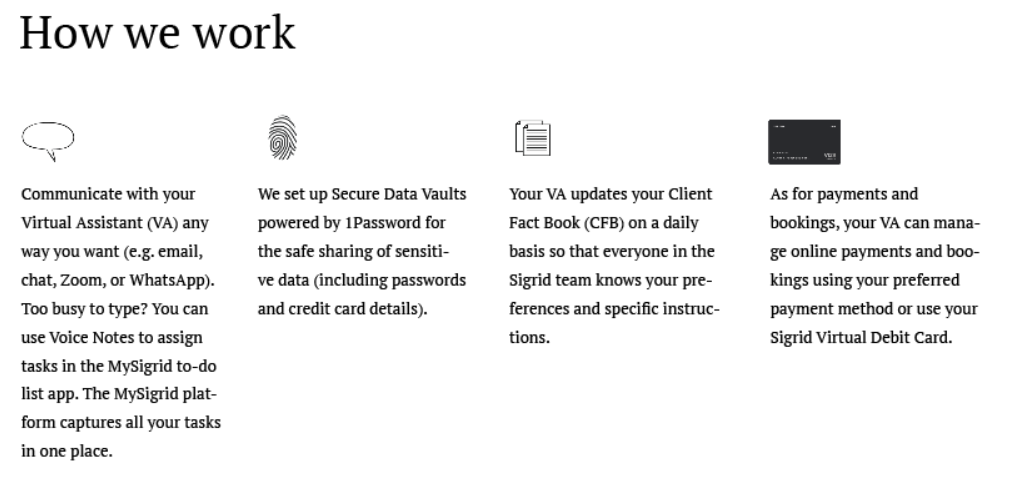
The Sigrid team utilizes a collaboration platform called MySigrid to solve problems and accomplish tasks collectively. MySigrid also serves as a centralized hub for communication between Virtual Assistants and clients.

Client requests are captured and converted into tasks in MySigrid. While primary VAs manage these tasks, they may be delegated to an Associate Virtual Assistant and Specialists with expertise in specific areas.

Encryption Data Protection

Concerned about sharing sensitive data with your virtual assistant online? Sigrid sets up Secure Client Vaults powered by 1Password, ensuring secure sharing of sensitive information between clients and dedicated VAs.

Seamless Continuity + Customized Service

Sigrid promises uninterrupted service of consistent quality, offering seamless continuity. Clients’ dedicated VAs utilize MySigrid to record all gathered information, including unique preferences, in the Client Fact Book (CFB). Thus, even if the primary VA is on leave, another VA can step in and deliver the same level of personalized service with meticulous attention to detail.

Clients’ distinct preferences are documented in MySigrid. 

Online payments with Sigrid Virtual Debit Cards

Clients can choose to share their credit card details in the Client Secure Vault or request a Sigrid Virtual Debit Card to be issued. The card can be topped up as needed, and usage is continuously monitored by Sigrid management.

Dedicated Support + Backup

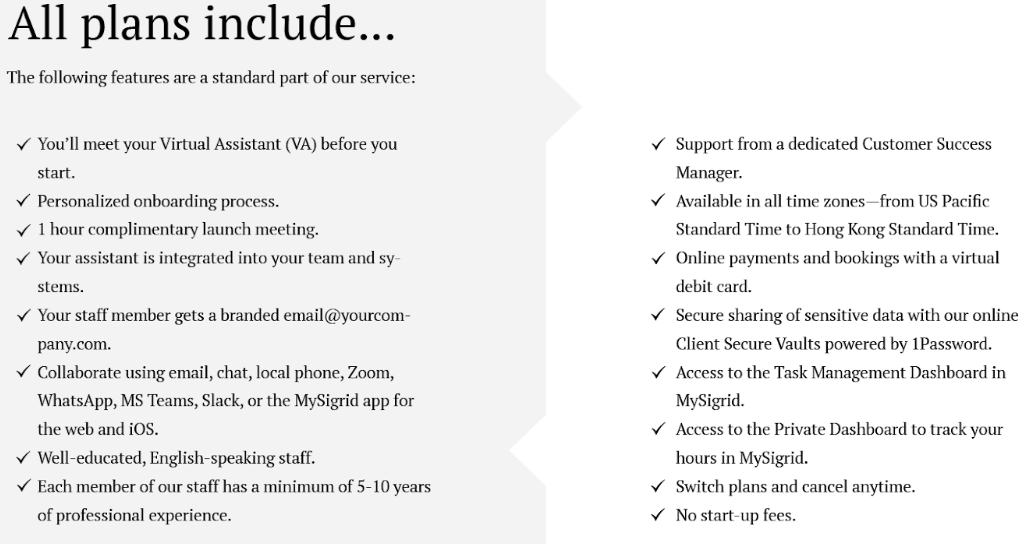
Sigrid’s team structure is a key differentiating factor. Each client is assigned a Dedicated VA who functions as a fully integrated team member, even receiving a local telephone number and branded company email.

Supporting the Dedicated Virtual Assistant are:

  • A Customer Success Manager (CSM) – This is an experienced VA who oversees the work of several VAs to ensure adherence to standard procedures. The CSM also conducts continuous training and functions as a back-up to the dedicated VAs to guarantee seamless continuity.
  • One or more Associate Virtual Assistants (AVAs) – These junior VAs focus on supporting the clients’ Dedicated VAs. AVAs have been through the same demanding recruitment process and receive extensive classroom and on-the-job training.
  • A team of Specialists – These Specialists focus on travel management, expense management, IT support, research, bookkeeping, Social Media Management, and other areas of expertise.

Sigrid ensures your VA thrives!

In addition to ensuring that your Virtual Assistant (VA) has all the necessary tools and systems in place, we also provide a co-working space where your VA can connect with the entire Sigrid community. They will have access to team-building events, training sessions, and monthly social gatherings.

We prioritize your VA’s success by not only equipping them with the essential resources but also by offering a co-working space where they can foster connections within the Sigrid community. This inclusive environment provides opportunities for team-building events, training sessions, and regular social gatherings.

Sigrid Services

Clients can delegate an array of work-life tasks to a team of highly experienced Virtual Executive Assistants/Personal Assistants and Specialists. As long as the tasks can be managed remotely and are completely legal, Sigrid is more than happy to assist you. 

Sigrid provides a Work-Life service. Their services include:

Work Admin

  • Calendar Management
  • Meeting Scheduling
  • Travel Management
  • Project Management Assistance
  • Personal Admin
  • HR (Attendance Monitoring, Timesheets & Basic Payroll)
  • Bookkeeping
  • Social Media Management 
  • IT Support
  • Specialized Research
  • Document Management
  • Online Shopping
  • Email Inbox Management
  • Expense Management
  • Vendor Sourcing
  • Online Payments with a Virtual Debit Card
  • Contact Profiling

Personal & Family Logistics

  • Household Maintenance
  • Household Repairs
  • Child & Family Logistics
  • Personal & Family Agendas
  • Bookings at Pubs, Restaurants & Hotels
  • Activities & Entertainment
  • Birthdays & Holidays
  • Child Care & Schools
  • Home, Car & Garden
  • Online Bills Payments
  • Event Management
  • Health & Personal Care
  • Appliance Warranties Management
  • Reminders of Important Dates & Events

Sigrid’s on-demand administrative support is available across time zones in Asia, Europe, and the US. And thanks to their subscription pricing model, clients can upgrade or downgrade their subscription hours depending on their needs or the needs of their business. 

The MySigrid To-Do-List App

For their convenience, clients can communicate with their VAs through the MySigrid Assistant web app/mobile app. This is a to-do list app customized for delegating tasks to remote teams. The app allows Sigrid’s clients to seamlessly delegate tasks to their dedicated Virtual Assistants. 

Key features:

  • View all delegated tasks in one place.
  • Quickly capture tasks anywhere using the rich chat interface.
  • Track real-time progress towards task resolution.
  • Receive reminders about important dates and events.
  • Monitor your remote staff member’s availability (‘On Duty’ status).
  • Keep an eye on subscription usage in real-time.
  • Monitor Performance in Real-Time

Want to know precisely how your Virtual Assistant (VA) spends their time or which projects and tasks consume the most time?

Or perhaps you’re curious about how often deadlines need to be adjusted? We have you covered with the KPI Dashboard in MySigrid.

Sigrid Plans and Pricing

VAA exclusive: 2 FOR 1 – Sign up for one of Sigrid’s plans, get the first two months at 50% off!

Dedicated VA Plans

Sigrid offers subscription pricing, from full-time to occasional use. Their dedicated VA plans include:

  • The Personal Plan – Suitable for people who need a few hours of support each week from a Dedicated VA and various Specialists (minimum of 15 hours of support each month for one user).
  • The Start-up Plan – Suitable for people who frequently travel for work or have a busy schedule. The plan can accommodate multiple users who need at least 30 hours of support per month. 
  • The Growth Plan – Suitable for people who frequently travel for work or have a busy schedule. The plan can accommodate multiple users who need at least 60 hours of support per month. 
  • The Enterprise Plan – Suitable for people who frequently travel for work or have a busy schedule. The plan can accommodate unlimited users who need at least 120 hours of support per month. 

Clients can book a free consultation with Sigrid to learn more about how the service works, Book a Demo, or choose to sign up for one of the four plans.

If you are interested in learning more about how Sigrid is different from alternative VA services, check out their FAQ page.

Leveraging Tech & Human Ingenuity to Help People Live Better Lives 

According to Paul, technological innovation is rapidly changing the world we live in. And while technology is often portrayed by the media as a threat to our livelihoods, Paul believes that tech can be fused with human ingenuity to deliver exceptional services and improve lives.  

According to Paul, Sigrid focusses on creating business services that harness the latest technologies while remaining grounded in human empathy. Sigrid’s highly trained Virtual Executive Assistants and Specialists support their clients through MySigrid – a custom-built comunication & collaboration platform, built by delegation experts in collaboration with virtual assistants, and are support by state-of-the art tech products. 

The end result? World-class virtual assistant services that help people get more tasks done without sacrificing their quality of life. 

Sigrid’s Mission 

Sigrid’s mission is to deliver premium virtual assistant services that support the way people live and work now. The team behind Sigrid wants people to live balanced lives that are supported by work rather than work-focused lives. 

They believe that people need plenty of opportunity for rest, recreation, and meaningful relationships if we want to overcome the ongoing burnout and mental health crises. They extend this philosophy of holistic wellbeing to both their clients and employees. 

Sigrid’s Vision 

Sigrid’s vision is to improve people’s daily lives on both sides of the MySigrid platform, one working relationship at a time. The company wants to provide skilled virtual assistants with exciting job opportunities while also giving them access to affordable healthcare and generous time off. On the client side, Sigrid wants to give busy executives and entrepreneurs the opportunity to access affordable support. By delegating secondary tasks to highly experienced Virtual Executive Assistants, executives and entrepreneurs can reclaim their free time and achieve new levels of productivity.

Sigrid Alternatives

There are many great Virtual Assistant companies that provide dedicated VA services, like ClearDesk or TimeEtc that are based out of the US. From the Philippines you can check out Remote CoWorker or from Central America there is Virtual Latinos.

The advantage of a Sigrid assistant over the services mentioned above is the fact that:

  •   You get a dedicated EA/PA (only the top 1%),
  •   You get support from a team of specialists (only the top 1%),
  •   Your EA/PA undergoes weekly training and is supported by a Customer Success Manager and a professional management team,
  •   A back-up team supports you for critical tasks outside your Service Hours,
  •   Time zone coverage across the US, Europe, and Asia,
  •   A structured onboarding process – you meet your EA before you start,
  •   Local telephone numbers,
  •   Branded EA email,
  •   Integration with your personal preferences,
  •   Buy ad-hoc hours to handle peak demand for support,
  •   Online payments and bookings with a virtual debit card,
  •   Secure sharing of sensitive data, passwords, and documents with the Secure Client Vault.
  •   The Service is ‘On’ Monday till Friday in your time-zone.

If you’re looking for more help in outsourcing business processes to the Philippines, you might want to consider onlineJobs.ph or FreeeUp, two well-rated marketplaces where you can connect with qualified assistants.

Your Turn

Have you worked with Sigrid? If so, please leave a brief review below to help others with their decision.

Read More

Remote Marketing Team Management Guide

Remote Marketing Team Management Guide

Managing a remote marketing team can be particularly difficult when you are new to the whole thing. It’s not easy to coordinate everyone’s actions correctly when you can’t meet in-person. Luckily, there are some things you can do to streamline the process of managing your remote marketing team. Hence, here’s the guide to remote marketing team management.


#1 Plan A Remote Hiring and Onboarding Process

First and foremost, you need to plan a remote hiring and onboarding process which will help you create your remote marketing team or work on the one you already have. Here are some tips to get you started with the hiring and onboarding of your team members:

  • Search for potential candidates on such platforms as LinkedIn and Indeed. You can also post job listings on them as well as on other popular job boards to promote your vacant positions. When posting the job listings, make sure to add that the job is available for any location and will need to be done remotely.
  • Outline your virtual hiring process by starting with the resume review process and getting to the actual hiring. The best thing you can do is have a virtual interview with potential candidates and maybe even give them a test task to see what their abilities are and whether they will fit your job position.
  • Be objective during the hiring process and don’t judge the candidates by their location. This could prevent you from finding good talent. Look at their experience, education, skills, and achievements instead.
  • Inform your chosen candidates that they got the job and welcome them into the team. Explain to them all the basic requirements of their job and introduce them to their team members. Make sure they fill out all the necessary paperwork to get started.
  • Check-in on the new members of your remote marketing team after some time has passed since you hired them. See whether they are satisfied with their job and how well they are performing within your team.

#2 Find and Use Digital Productivity Tools

One thing that doesn’t seem obvious but could actually be very useful is finding and using digital productivity tools. These can help you maintain consistently high productivity and performance levels in your team for long periods of time. Even the calendar you use for scheduling events and meetings could help a lot with productivity.

Use a project management tool like to create daily, weekly, or even monthly tasks. This will allow you to keep track of all the tasks planned, completed, and canceled by all of your team members. Moreover, this can also help you get more accurate data about the performance of your employees. Some suggested tools are:

  1. Monday.comMonday.com is an award-winning cloud-based work operating system (Work OS) that enables teams to collaborate and build custom workflows. After you sign up for a free trial and create an account, you can log into the web app. Here, you’ll see a blank calendar and your dashboard. There is a minimum of 3 seats per plan, so pricing starts at $24/mo for 3 team members on their basic plan.Sign up for a free trial!
  2. WorkpulsWorkPuls provides you with insights that you would not otherwise be able to see. Such as identifying tasks taking longer than you’d expect, which team members are working the fastest, amount of idle time, and much more.

WorkPuls is an employee monitoring, time tracking, and automatic time mapping platform.

This software provides a range of tools and features that enable managers and business owners to increase their employee’s productivity.

The company and WorkPuls’ support staff are based in California, U.S.

Pricing starting at $6 per month, per employee.

Sign up for a 7-day free trial!

3. DeskTimeDeskTime is an employee time and productivity tracking tool. This software provides a range of tools that helps business owners and managers boost their team member’s productivity.

After installing this software on the computer or device your remote team members are using, you can track their time, the apps they’re using, see screenshots, and track other productivity metrics.

The company and DeskTime’s support staff are based in Riga, Latvia.

Pricing plans start at $0/month for one user with their LTE plan.

Sign up for a 14-day free trial.

4. Hubstaff –  Hubstaff is a time tracking software built for remote teams. The company was founded in 2012 and their fully remote team is “based” out of Indianapolis, Indiana. Hubstaff offers several productivity monitoring features like an app and URL tracking, optional screenshots, and customizable reports. It’s designed to give you insight into how your remote team is spending their time so you can help them be more efficient.

VAA Exclusive: Use referral code VAA15 for 30% off your first 2 months of service! Hubstaff comes with a 14-day free trial 

5. Fiverr BusinessFiverr Business is an online marketplace and freelancing platform. Fiverr Business differs from other freelance platforms – like the Fiverr marketplace – by vetting freelancers and introducing collaboration tools. The annual membership is priced at $149 per year. At the time of publishing, however, Fiverr Business is waiving that fee for the first year. That means you can sign up and start using the platform today for free.

6. MyTimeInMyTimeIn is a next-generation remote productivity platform that helps business owners and managers increase the overall productivity of remote employees.

This software provides a suite of tools that enable you to track time, monitor what your virtual assistants/employees are working on, track attendance, see screenshots of their workflow, and much more.

The company and MyTimeIn’s support staff are based in California, U.S.

Pricing plans start at $29.99 per month. If you want to see how MyTimeIn works, you can schedule a time to see a demo of the software.

#3 Schedule and Run Virtual Team Meetings

The next thing you should do is start planning the way you will schedule and run virtual team meetings. In addition to that, you will also need to plan out one-on-one virtual meetings. Here are some things to keep in mind:

  • Decide which meetings you actually need rather than having as many as you can. This will help you channel your time and energy into the meetings you will actually make productive rather than meetings that will end up with not very significant results. If you need a monthly meeting to discuss performance and set new objectives, make sure to set it up in time. But if you don’t need a weekly meeting, just don’t run it.
  • Have a regular schedule for meetings. There will be times when you need to organize them on the spot, but you should mostly stick to a premade schedule so that everyone has the opportunity to attend at a suitable time.
  • Prepare for every meeting separately. Have an outline for every meeting so you know what you want to discuss, especially the specific points you might end up forgetting if you don’t write them down beforehand.
  • Choose the software you will be using for virtual meetings. Make sure that everyone knows how to use the software and run some tests to see how the meetings would go. Educate everyone about how they should deal with technical issues they might encounter at one of the meetings.
  • Be mindful of the time zones. This is especially important if your team members are located all over the world. If your team is not too big, you probably won’t struggle with time zones too much.
  • Create a shared calendar where everyone will be able to see when the next meeting is. Add all the necessary details to every meeting scheduled on the calendar.
  • Discuss the meetings beforehand with the team members that you would like to present at the meeting along with yourself. You can also discuss meetings beforehand with other employees to see if they have anything they would like to submit like slides, latest data, etc.
  • Wait for everyone to join the meeting once you launch it. If anyone is experiencing technical problems, try to help them however you can. If the problem is too big, consider rescheduling the meeting.
  • Let your team members talk during the meeting instead of only talking yourself. Brainstorm ideas, analyze past performance, and so on. In other words, run the virtual meetings just the way you would run regular ones.
  • Wrap up the meetings on a meaningful note and ensure that you went through every important point. Likewise, use an icebreaker at the beginning of the meeting if you feel there is some awkwardness.
  • Improve the virtual team meeting procedure over time. Change the schedule if it’s needed or make more team members present if you want interaction. Consider collecting feedback regularly too.

#4 Respect Boundaries and Remember Time Zones

As mentioned earlier, remembering time zones when scheduling virtual team and one-on-one meetings is one of the most important things you need to do when managing your remote marketing team. Having a meeting when the time is good for you but it’s nighttime for the other person is definitely not a good idea.

At the same time, you need to respect boundaries just like you would in an office. Don’t encourage discussing politics or any private matters that are not essential to your work. It’s just not a good idea and doing so will just lead to more problems rather than resolutions. After all, being professional should be your number one priority.

#5 Check-In with Team Members Regularly

Checking-in with team members regularly might not seem like something particularly important, but it can actually help you in so many ways. Just reaching out once in a while to check the performance or satisfaction of your employees can help you:

  • Connect with Them Better: By reaching out so often, you will be able to better understand your employees and find a way to connect with them better which will improve your relationships.
  • Ensure They Are Satisfied: You will also be able to make sure they are satisfied with their job and are mentally well. Stress can be a big issue, so it’s worth checking your team’s mental health once in a while.
  • Get More Feedback: There will also be more opportunities for getting feedback from your employees which will help you improve the different aspects of your remote marketing team.
  • Improve Overall Performance: By checking the satisfaction level of your employees and connecting with them better, you will be able to motivate them to increase their productivity which will improve their overall performance.

#6 Form A Work Culture of Inclusion

Forming a work culture of inclusion is not an easy feat as it will take some time to actually develop. Here are some ways you can make this happen faster:

  • Create Opportunities for Bonding: Instead of waiting for something to happen, create such opportunities yourself. Make sure your employees have a messaging channel for casual chatting and host movie nights where everyone can watch a movie from home while discussing it in a chat or meeting.
  • Connect In-Office and Remote Teams: Don’t just talk to your remote marketing team separately. Instead, make sure that all departments have the ability to talk to each other both while working and during breaks.

#7 Set Up Proper Communication

Speaking of communication, this is the last and by far one of the most important things you need to do. Setting up proper communication will help you manage your remote marketing team more smoothly and allow you to have way more control and organization than you would with poor communication.

A dedicated messaging platform like Slack will allow you to have multiple channels for messaging while also letting you have direct-message conversations. Your virtual team meeting software will also help you with communication, but it’s important to remember about emails as well because they let you send much bigger files and longer tests than a messaging platform does.

#8 Hire a team from a professional company!

There are a ton of Virtual Assistant Companies out there that can help you achieve your goals based on your unique needs.

One of our partners, ClearDesk, are offering a free consultation call to see how they can help you! They also offer a free 7 day trial – you have nothing to lose! You can read my review on ClearDesk and find out more information about the services they offer by clicking here. 

Final Thoughts

All in all, managing a remote marketing team is not as difficult as it may seem at first glance. Once you get the hang of it, managing your remote marketing team will become relatively easy. Use the tips in this article to start managing your team more effectively.

Check out Virtual Assistant Assistant’s Resources & Tools page to find further information!


Melissa Mauro is a freelance writer who creates quality and original content. She is
working for the companies Best Writers Online and Online Writers Rating writing services
review. She believes that creativity and improvement are things, which distinguish a good
writer.


Thank you for your contribution Melissa!

Read More

FlexJobs

FlexJobs is a leading jobs board for telecommuting and work-from-home jobs. The company began in 2007 to provide a central hub of scam-free, personally reviewed remote job postings.

Although headquartered in Boulder, Colorado, FlexJobs practices what they preach and have team members spread out virtually throughout the country. For Flexjobs review, read on.

About FlexJobs

flexjobs reviewFor job-seekers, FlexJobs features a wide variety of employment opportunities from companies large and small, and for those seeking virtual workers, the platform is an opportunity to reach a broad and motivated applicant pool.

The company was founded by Sara Sutton Fell, who began looking for flexible work arrangements while she was pregnant with her first child. Almost immediately, she discovered how challenging it was to find virtual jobs that were legitimate and in-line with her career.

FlexJobs is a leading jobs board for telecommuting and work-from-home jobs. FlexJobs is the best, most trusted service providing the largest database of hand-screened and current professional, remote, work from home, and flexible jobs — no scams or junk jobs. Plus, career coaching, expert articles, skills courses, and much more.

Location: They are located in – 4845 Pearl East Cir, Ste 101 23790, Boulder, Colorado, 80301, United States.

FlexJobs Intro Video

FlexJobs Services

They provided services like customer service, marketing, IT, accounting, graphic design, etc.
Employers can post their virtual assistant positions to FlexJobs and browse the resumes, work samples, and skills test results from qualified applicants.

Job postings are hand-screened by a team of researchers to make sure that each listing on the site is from a legitimate employer. Expect to have the FlexJobs crew write their own description of your company and give some scrutiny to your position before it goes live.

There are more than 50 career categories and you can find virtual workers in a broad range of fields, including customer service, marketing, IT, accounting, graphic design, and more. The focus appears to be more on ongoing employment, rather than on short-term freelance hires.

FlexJobs has a 95.7% rating (out of a possible 100) on Sitejabber, based on 1,181 reviews. Of those reviews, 833 users rated FlexJobs five out of five stars.

FlexJobs Plans and Pricing

flexjobs pricing

FlexJobs Specializations 

Telecommuting jobs, part-time jobs, freelance jobs, work from home jobs, remote jobs, telecommute jobs, flexible schedule jobs, full-time jobs, alternative schedules, virtual jobs, digital nomads, remote work, flexible jobs, and work from anywhere.

FlexJobs Alternatives

FlexJobs aims to differentiate themselves through their employer vetting and job curation process, which is good news for job-seekers. And since the talent is paying to view your job listings, you can generally expect a more motivated application, or at least a pool that is taking their job search seriously.

But you can post your virtual assistant position on any number of sites, including the big freelance marketplaces like Dynamite Jobs and Just Remote. You might cast a wider net (for better or worse), and open yourself up to candidates from all around the world, if you’re open to that.

Check out these other awesome sites:

Your Turn

Now that you have read flexjobs review, it’s your turn to decide whether to hire the virtual assistant company.

Have you hired through FlexJobs? What did you think? Leave a comment below to help others with their decision.

Read More

How can Fiverr assist you in your path to success?

How can Fiverr assist you in your path to success?

Whether you are looking hire a freelancer for a one-off task, to scale your business, or looking for online training – Fiverr has a program for you! Schedule a free consultation call with me to find which is best for you!

image

Fiverr Services

Fiverr works a little differently than other freelancing sites. Instead of creating a job posting and waiting for workers to bid on your job, on Fiverr the workers state what they can do for you, and in what budget and timeframe.

You’ll find just about every virtual service imaginable, but it’s more of an a la carte menu system than a request for proposal system. (Though if you can’t find exactly what you like, you can submit a custom request too.)

Get help with:

Check out Virtual Assistant Assistant’s page here and see other user reviews!

image

Fiverr Business

Fiverr launched a platform called “Fiverr Business”, which is designed to make scaling and execution seamless for teams.

The B2B platform provides teams with access to a vetted marketplace of on-demand freelance talent, collaboration and project management tools, one centralized payment method, 24/7 live chat support, and their own Business Success Manager that can help match their business with the best talent for them.

The annual membership is priced at $149 per year. Fiverr Business is waiving that fee for the first year. That means you can sign up and start using the platform today for free.

You’ll find freelancers to carry out just about any tasks that can be completed remotely. This includes:

Check out Virtual Assistant Assistant’s page here and see other user reviews!

image

Fiverr Learn Services

Fiverr Learn is an e-learning platform providing online training. Where Fiverr Learn differs from other learning platforms is that the instructors have been handpicked to create content for the platform.

The courses offered cover the following categories:

Individual courses range from $23-$94. But also offer bundled prices if you were interested in multiple courses.

Check out Virtual Assistant Assistant’s page here and see other user reviews!

Interested in the above or looking for other Virtual Assistant/outsourcing services?

Schedule a free consultation call with me – let’s find what you need to be successful!

Read More

Smith.ai

Smith is virtual call answering service for small business and individuals. They answer your inbound calls, take messages, arrange appointments, and more, so you don’t have to.

The company was founded in 2015, their headquarters are in Palo Alto, CA, and their team is spread across the US.

VAA Exclusive: Use code VAA100 for $100 off your first month of service!

About Smith.ai

The company was founded by Aaron Lee and Justin Maxwell. Aaron is a former CTO at The Home Depot and one of the founding engineers on Google Video and led YouTube monetization.

Justin was the design lead for Google’s Android Auto, and has designed products for Apple, Mint, Sony, and plenty of other startups.

They started Smith because they are passionate about helping small businesses and startups. Justin said they had the idea for Smith, “After repeatedly hearing that existing options simply weren’t what our customers wanted.”

Where Smith separates themselves from a lot of the other virtual receptionist services is in their billing. They charge per-call, not per-minute.

VAA Exclusive: Use code VAA100 for $100 off your first month of service!

This model will offer greater value to businesses that receive fewer calls with longer duration. Don’t worry about spam or unwanted calls either, these do not count towards your monthly quota of calls.

Smith.ai Services

Their receptionists handle just about anything they can from the end of a phone line. Most commonly their services include:

  • Call answering
  • Taking bookings and scheduling appointments
  • Live call transferring
  • Delivering voicemails via SMS or email
  • Providing you with instant call summaries
  • Setting up custom voicemails
  • CRM integration with many popular CRMs
  • Spanish speaking callbacks
  • Zapier-parseable email format for Zapier integration
  • Call screening

Smith not only take inbound calls, they can make outbound calls on your behalf too. You can leave it to their receptionists to book appointments, return calls, find out information, or carry out cold calling.

Smith.ai Plans and Pricing

Smith charge per call, not per-minute like most virtual receptionist services. They currently have three monthly plans as follows:

  • Starter – $60 per month – 10 receptionist calls and 1 live transfer phone number.
  • Basic – $150 per month – 30 receptionist calls and 2 live transfer phone numbers.
  • Pro – $450 per month – 100 receptionist calls and 5 live transfer phone numbers.
  • Custom – If none of the above meets your needs they are open to putting together a custom plan if you contact them.

VAA Exclusive: Use code VAA100 for $100 off your first month of service!

All of their packages also include:

  • US-based receptionists available during business hours of 9am to 9pm EST/ 6am to 6pm PST.
  • Daily and instant summaries of calls taken via text or email as and when you want it.
  • Live transfer of priority calls.
  • Voicemails transcribed and sent to you via email or SMS.
  • Spam and sales calls are blocked without charge.
  • Call screening and prioritization of calls.

They offer a free 30-day/10-call trial if you want to test their services. You can even keep your number if you decide not to continue with them.

Smith.ai Alternatives

Gabbyville and Vicky Virtual are two highly rated virtual receptionist companies worth seeking a quote from.

Like a lot of virtual receptionist companies, they both operate on a pay-per-minute model however, so your decision may be swayed depending on which model offers the most value to your business.

Your Turn

Have you worked with Smith? If so, please leave a review below to help others with their decision.

Read More