VirtualStaff.ph vs Outsourcing Agencies: Cost, Control, and Quality Compared

VirtualStaff.ph vs Outsourcing Agencies: Cost, Control, and Quality Compared

When you’re trying to hire virtual staff in the Philippines or build a remote team, it’s easy to default to an outsourcing agency. They promise a “done-for-you” solution, but often at a cost that eats into your profits and limits your control.

With agencies, you usually pay a high monthly fee, never know exactly what your staff earns, and have little say in who you actually work with.

VirtualStaff.ph flips that script. For just $99/month per seat, you get to hire great part-time or full-time staff; fast, simple, and without the usual hiring headaches. You manage their workday, and our platform makes everything else effortless.

This guide breaks down the difference between VirtualStaff.ph vs. Agencies, so you can see which one truly works better for your business.

Why Businesses Compare VirtualStaff.ph vs. Agencies

Here’s how the typical agency setup looks:

  • They choose your staff for you.
  • You often start working with someone you’ve never met.
  • They charge you $2,000/month (or more) but pay the staff far less.
  • You have little control over day-to-day operations.

It feels convenient at first until you realize you’re overpaying, under-informed, and unable to build a real working relationship with your team members.

VirtualStaff.ph takes a simpler approach:

  • You choose your staff from over 1M pre-vetted Filipino professionals.
  • You decide what to pay them (most businesses spend $500–$1,500/month, depending on the role).
  • You manage their daily work directly, without middlemen slowing you down.
  • Our platform handles the setup, payouts, and admin for a flat $99/month per seat.

The Core Difference: Control and Simplicity

With Agencies:

  • Little to no say in who gets hired.
  • Higher costs, lower pay for the actual staff.
  • Communication often goes through the agency.

With VirtualStaff.ph:

  • You interview and hire the person you want.
  • You set the salary.
  • You work directly with your staff from day one.
  • The platform takes care of the admin, so you can focus on results.

It’s about giving you the best of both worlds: the control of direct hiring and the convenience of a simple, affordable system.

The Real Cost Difference

Agency Model:

  • You pay $2,000/month.
  • Staff get $800–$1,000/month.
  • The agency keeps the rest as markup.

VirtualStaff.ph Model:

  • You pay your staff $500–$1,500/month (you choose).
  • You pay $99/month per seat to use the platform.
  • No inflated markups.

The result? You save thousands per year, and your staff earns more, which means they’re happier, more motivated, and more likely to stay.

How VirtualStaff.ph Works

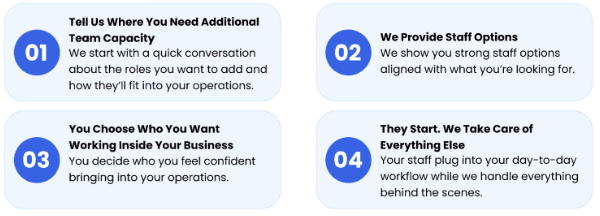
  1. Buy a Seat
    Each seat lets you hire one Filipino staff member, part-time or full-time.
  2. Open Your Role
    Your role goes live to thousands of qualified, pre-vetted staff.
  3. Hire & Get Started
    Interview, choose your ideal staff, and start working together right away.

It’s that straightforward. No long contracts. No waiting weeks for “placements.”

Why Businesses Prefer VirtualStaff.ph Over Agencies

  • Direct Hiring: You meet, interview, and choose your own staff.
  • Cost Savings: No bloated monthly fees.
  • Better Retention: Fair pay leads to loyal, motivated staff.
  • Scalability: Add seats anytime without complicated agreements.
  • Flexibility: Hire full-time or part-time.
  • Transparency: Know exactly what your staff earns.

Roles You Can Hire

Popular roles include:

  • Virtual Assistants
  • Customer Support Representatives
  • Bookkeepers & Accountants
  • Social Media Managers
  • E-commerce Support Staff
  • Content Writers & Designers
  • Real Estate Assistants
  • Healthcare Admin & Billing Staff

No matter the role, the process is the same: quick, transparent, and affordable.

Scaling Without Agency Restrictions

Need to grow quickly? Agencies often slow you down with long internal processes.

With VirtualStaff.ph:

  • Add extra seats instantly.
  • Open new roles and start getting applications within days.
  • Hire and start training without delays or inflated costs.

From hiring your first virtual assistant to building a 10-person remote team, scaling is simple and cost-effective.

Step-by-Step: Getting Started

  1. Sign Up – Create your account in minutes.
  2. Choose a Seat – $99/month for each staff member you want to hire.
  3. Add Your Role – They connect you with the right staff.
  4. Hire & Manage – You manage the workday; they handle the admin.

Why 25,000+ Businesses Trust VirtualStaff.ph

Across industries, from e-commerce and real estate to healthcare and marketing, businesses choose VirtualStaff.ph because it’s:

  • Affordable without sacrificing quality.
  • Simple and fast to hire.
  • Flexible enough to grow with your needs.

Final Thoughts: Choosing the Smarter Hiring Model

If you want:

  • Direct control over hiring
  • Reliable, skilled staff at a fraction of local costs
  • A system that’s fast, simple, and scalable

…then VirtualStaff.ph is the clear winner over traditional agencies.

Hire great staff starting at $99/month per seat, and build your remote team without the usual headaches.


Read More

Understanding the Effects of Extended Screen Time on Virtual Assistants

Understanding the Effects of Extended Screen Time on Virtual Assistants

With the rapid integration of technology into our daily lives, virtual assistants improve productivity and connectivity. The increase in screen time can have negative effects on our health and well-being. As users engage with devices for longer periods, there are various physical and psychological impacts that can emerge, raising questions regarding productivity and lifestyle management. Keep reading to learn all about it.

The Physical Impact of Extended Screen Time

Extended screen time affects users physically and manifests in eye strain, headaches, and other discomforts. These symptoms can arise from prolonged exposure to screens without adequate breaks. The phenomenon, commonly referred to as computer vision syndrome, affects a huge portion of the population that spends over two hours per day in front of digital devices.

Symptoms can range from dryness and irritation to blurred vision. Focusing efforts on screens can decrease visual acuity. Technologies can provide some reprieve and filter out harmful wavelengths of light emitted by screens and contributing to better eye health.

Strategies for Healthy Screen Use

Speaking of helpful technologies, there are many strategies that can mitigate the adverse effects of prolonged screen time. Set limits on daily usage so that individuals can be aware of their engagement and promote mindful use of technology. Screen time management apps can assist in monitoring usage patterns and make it easier to identify excessive engagement. For those who have to engage in prolonged screen time for work reasons, blue light glasses can alleviate some discomfort. In your free time, integrate technology breaks into daily life and promote a harmonious balance between virtual and real-world interactions. The use of filters and adjustments to device settings to reduce eye strain and improve comfort.

The Psychological Effects of Screens

Mental health is influenced by screen time in conjunction with the interactions we have through virtual assistants. Studies have shown a correlation between excessive digital engagement and increased rates of anxiety, stress, and depression among users. Virtual assistants can streamline tasks and reduce workload, but the constant connectivity can paradoxically create pressure.

Excessive screen time can hinder face-to-face interactions and result in feelings of isolation. This growing trend results in a disconnect from reality and establishes boundaries with technology. Engaging in digital detox periods, where users deliberately reduce their screen exposure, can restore balance. Such strategies promote mental well-being and encourage productive engagements with virtual and physical environments.

Impact on Sleep Patterns

The link between extended screen time and disrupted sleep patterns has been well-documented in research. Users exposed to screens before bedtime tend to experience longer periods of wakefulness due to the blue light emitted by devices. Blue light interferes with the production of melatonin, the hormone responsible for regulating sleep cycles. As melatonin levels drop, individuals struggle to fall asleep. Poor sleep quality can contribute to a decline in cognitive functions like memory and attention span. The recommendation is to limit screen exposure at least an hour before bed for improved sleep quality.

Night mode settings on devices can mitigate some effects, and consistent habits can provide tangible results. Adopting relaxing pre-sleep routines, free from screens, allows room for a more restful transition into sleep, improving productivity during waking hours.

Physical Well-Being and Posture Issues

Extended screen time can affect physical well-being regarding posture. Many users become absorbed in their screens, leading to slouched or awkward positions. This poor posture can result in musculoskeletal issues, including back pain, neck stiffness, and shoulder discomfort. Ergonomic working conditions can reduce these issues and promote healthier posture habits. Implement proper chair height and screen visibility. Their computer screen should be at eye level to minimize strain.

Regularly incorporating stretching routines into daily activities can alleviate physical discomfort so that the body remains agile. Awareness of posture while engaged with screens leads to healthier results in the long term, guiding individuals towards a more comfortable and efficient work environment.

The Role of Breaks and Rest

Breaks from screens enable both physical and mental recovery, encouraging productivity in the process. Creative workflows, light exercise, or even a brief walk outdoors can provide rejuvenation. Research indicates that short breaks can improve performance.

Establishing a schedule that incorporates regular breaks helps users maintain focus and reduce fatigue. The Pomodoro Technique, which advocates for 25 minutes of focused work followed by a 5-minute break, can maximize engagement and minimize burnout. When people prioritize rest, they can actively improve their performance and well-being.

A conscientious approach to screen time maintains physical and psychological well-being in a digital environment that is here to stay. Understanding the impact of extended screen time on virtual assistants allows for informed decisions regarding technology use. By applying effective strategies to manage engagement, users can boost their health and productivity.

Read More

The Rise of Virtual Assistants: Revolutionizing Work and Daily Life

The Rise of Virtual Assistants: Revolutionizing Work and Daily Life

In the rapidly evolving world of technology, virtual assistants have emerged as powerful tools that are reshaping how people work, manage their lives, and interact with devices. These digital helpers, powered by artificial intelligence (AI) and machine learning (ML), offer a wide range of services from managing calendars and setting reminders to answering queries, automating business tasks, and even performing complex data analysis. As both individuals and businesses seek to become more efficient and streamlined, virtual assistants are becoming indispensable assets.

What Are Virtual Assistants?

A virtual assistant is a software-based agent that can perform tasks or services for an individual based on commands or questions. These tasks can range from simple things like setting alarms and sending emails to more advanced functions such as analyzing customer data, scheduling meetings, or even managing a company’s digital infrastructure.

Virtual assistants are generally categorized into two main types:

  • Consumer-Oriented Virtual Assistants

These include popular voice-activated assistants such as Amazon’s Alexa, Apple’s Siri, Google Assistant, and Microsoft’s Cortana. They help users perform personal tasks like checking the weather, playing music, or sending text messages.

  • Business-Oriented Virtual Assistants

These are more robust and are often tailored to handle repetitive tasks such as customer service (via chatbots), data entry, lead generation, scheduling, and email management. They are used by startups, SMEs, and even large corporations to reduce labor costs and increase productivity.

Key Technologies Powering Virtual Assistants

The effectiveness of virtual assistants depends on several key technologies:

  • Natural Language Processing (NLP): Allows assistants to understand and interpret human language.

  • Machine Learning (ML): Enables the assistant to learn from user behavior and improve over time.

  • Speech Recognition: Translates spoken commands into digital instructions.

  • Data APIs: Allows the assistant to retrieve or process information in real-time from other systems or databases.

Together, these technologies enable virtual assistants to mimic human interaction, improve with use, and integrate seamlessly into both personal and business environments.

Use Cases in Daily Life

Virtual assistants have found a natural fit in the daily routines of many people. Some popular everyday uses include:

  • Reminders and Scheduling: Assistants like Siri and Google Assistant can schedule meetings, set reminders, and alert you to upcoming tasks.

  • Smart Home Integration: With voice commands, users can control smart lights, thermostats, locks, and appliances.

  • Travel Assistance: Virtual assistants can provide real-time updates on flights, suggest routes, and even book hotels or transportation.

  • Entertainment: From playing music and podcasts to recommending TV shows, virtual assistants serve as personalized entertainment hubs.

These capabilities enhance convenience and help users manage their time more effectively.

Applications in Business

In the corporate world, virtual assistants are doing much more than just setting calendar appointments. Businesses are leveraging them for:

1. Customer Service Automation

Chatbots and voice assistants are being used to handle common customer queries, process refunds, and provide 24/7 support without human intervention. This reduces the burden on human agents and increases customer satisfaction.

2. Data Management and Research

Virtual assistants can process large volumes of data and extract relevant insights for businesses. For example, they can automate the retrieval and analysis of search engine data using tools like a google scraping api. This is invaluable for market research, competitor analysis, SEO, and lead generation.

3. Email and Communication Management

From sorting emails to drafting responses, business virtual assistants streamline communication, ensuring that important messages are never missed and repetitive tasks are minimized.

4. Human Resource Management

HR departments use virtual assistants to schedule interviews, onboard new employees, and respond to basic employee queries. This reduces the administrative load and improves employee experiences.

5. Project Management

Some virtual assistants are integrated into project management tools like Asana or Trello to send reminders, assign tasks, and track progress automatically.

Advantages of Using Virtual Assistants

1. Increased Efficiency

Virtual assistants free up valuable time by handling routine tasks, allowing individuals and teams to focus on higher-priority activities.

2. Cost Savings

Hiring human staff for every administrative role is expensive. Virtual assistants, often available via monthly subscriptions or even free apps, offer a cost-effective alternative.

3. Scalability

As a business grows, a virtual assistant can scale with it. You can easily add more features, integrate new platforms, or upgrade the assistant’s capabilities without needing to hire and train more staff.

4. 24/7 Availability

Unlike humans, virtual assistants don’t need breaks or sleep. This ensures continuous support and operation, which is particularly useful for global businesses with customers in different time zones.

5. Personalization

Modern virtual assistants can learn user behavior and preferences to offer personalized suggestions, which boosts user satisfaction and engagement.

Challenges and Limitations

Despite their advantages, virtual assistants are not without their drawbacks:

  • Data Privacy Concerns: Because they often access sensitive information, data breaches or improper handling of user data can pose serious privacy risks.

  • Limited Context Understanding: While AI is improving, virtual assistants still struggle with complex instructions, sarcasm, and contextual language.

  • Dependence on Internet and Integration: Most assistants require stable internet and seamless integration with third-party services, which may not always be possible.

  • Initial Learning Curve: It takes time for users to learn how to maximize the capabilities of their assistant, and for the assistant to “learn” from the user.

The Future of Virtual Assistants

The virtual assistant market is poised for explosive growth. With advances in AI, especially generative AI models like GPT, future assistants are expected to be even more intelligent, intuitive, and capable of handling nuanced, creative tasks.

Some anticipated trends include:

  • Multimodal Capabilities: Integration of text, voice, and visual inputs for more comprehensive interactions.

  • Emotional Intelligence: Enhanced ability to recognize and respond to user emotions.

  • Decentralized Personal Assistants: Running on local devices instead of cloud servers, offering more privacy.

  • Industry-Specific Assistants: Tailored for healthcare, law, finance, and other specialized sectors to handle domain-specific queries and tasks.

Conclusion

Virtual assistants are no longer futuristic concepts; they are practical, powerful tools used daily by millions around the world. Whether you’re a busy executive, a small business owner, or just someone trying to manage a hectic personal life, a virtual assistant can be a game-changer.

With their ability to handle everything from simple reminders to complex data processing like integrating a google scraping api for research virtual assistants are increasingly becoming central to productivity in both personal and professional settings. As technology continues to evolve, so will the capabilities and intelligence of these digital companions, promising a future where human and machine collaboration is seamless and deeply impactful.

Read More

Cybersecurity Essentials Every Virtual Assistant Must Know

Cybersecurity Essentials Every Virtual Assistant Must Know

Virtual assistants (VAs) are indispensable in today’s remote-first business environment. From managing emails and scheduling to handling sensitive documents and passwords, VAs often serve as the digital backbone of a company’s operations. With this access comes a heightened responsibility to protect client data and maintain secure workflows. Cybersecurity is no longer a concern only for IT departments, it’s now crucial knowledge for anyone operating in the virtual workspace.

As cyber threats evolve, so too must the awareness and preparedness of the professionals who support businesses online. Here are the key cybersecurity essentials every virtual assistant must know to keep themselves and their clients protected.

Understanding the Threat Landscape

Virtual assistants operate across multiple platforms, access cloud-based systems, and regularly communicate through email and messaging apps, all of which are prime targets for cybercriminals. The most common threats include phishing scams, social engineering, account takeovers, and ransomware attacks. These are often subtle and difficult to detect without the right training.

Recognizing red flags like suspicious file attachments, unusual login activity, or unsolicited requests for credentials is critical. Many attacks start with a single misstep, clicking a malicious link or downloading an infected file. Once a system is compromised, attackers can access client files, financial data, and internal systems, potentially leading to devastating consequences. Awareness of the impact of malware on businesses helps illustrate the severity of these threats. Malware infections can paralyze operations, result in lost revenue, and damage client trust, particularly if a VA is the source of the breach. Knowing how malware spreads and what to look out for is the first step in prevention.

Use Strong Password Hygiene and Authentication

Password security is one of the most basic yet commonly overlooked areas of cybersecurity. Virtual assistants often manage accounts across email, project management tools, social media, and financial platforms, making strong, unique passwords for each account a non-negotiable.

Using a reputable password manager can help VAs generate and store complex passwords securely, reducing the risk of reuse or weak combinations. Enabling multi-factor authentication (MFA) wherever possible adds an extra layer of protection, requiring a second form of verification, like a mobile code or biometric scan.

Never store passwords in plain text or unsecured documents. And when clients share credentials, it should be done through secure, encrypted methods, not via chat or email. Being proactive about authentication habits protects your systems and reinforces client confidence in your professionalism.

Secure Your Devices and Networks

Many VAs work from personal laptops or home offices, which can lack the enterprise-grade protections of a corporate network. Ensuring that your devices are secured is just as important as the work you do on them. That starts with keeping operating systems, browsers, and applications up to date to patch known vulnerabilities.

Installing and regularly updating antivirus software is another important step. While no system is impenetrable, reputable antivirus programs can detect and quarantine malicious files before they cause harm. Avoid using public Wi-Fi for client work unless you’re connected through a virtual private network (VPN), which encrypts your data and helps prevent interception by cyber snoops. It’s also a good practice to check your IP’s privacy status using tools like Whoerip.com to ensure you’re not exposing sensitive information while working online.

Firewalls should be enabled on all devices, and external storage (like USB drives) should be scanned before use. The more layers of protection you build around your working environment, the harder it becomes for cyber threats to breach it.

Practice Safe Data Management

Data security isn’t just about avoiding breaches, it’s about handling client information responsibly every step of the way. Virtual assistants often work with sensitive data such as personal information, payment details, login credentials, and business documents. Knowing how to manage this information securely is key.

Start by understanding and complying with any data protection regulations that apply to your clients, such as GDPR, HIPAA, or CCPA. This may include requirements for how long data can be stored, where it must be stored, and who can access it.

Use encrypted cloud storage for sensitive files and restrict access only to those who need it. Regularly audit shared folders and documents to ensure nothing is unintentionally left open to the public. When sharing files, prefer secure links with expiration dates or password protection over attachments.

Be Prepared with Incident Response Protocols

Even with the best precautions, no system is 100% immune to attack. That’s why it’s vital to have a plan in place for when things go wrong. Virtual assistants should be prepared to act quickly in the event of suspicious activity or a confirmed breach.

Know the first steps: disconnect affected devices from the internet, notify clients immediately, and document what happened. Having a clear chain of communication helps mitigate the damage and maintain transparency. It allows your client to activate their incident response protocols.

Keep regular, encrypted backups of important files and projects in case data is lost or compromised. Whether through cloud-based services or external drives, backups are a safety net that can mean the difference between a minor setback and a catastrophic loss.

Stay Educated and Continuously Aware

Cybersecurity isn’t static. New threats emerge constantly, and tactics that worked a year ago may be obsolete today. Staying informed about trends in cybersecurity, particularly those relevant to remote work and digital collaboration, is part of your responsibility as a VA.

Sign up for trusted cybersecurity newsletters, take online security awareness training, and attend virtual workshops when possible. Follow updates from software vendors, antivirus providers, and IT professionals. The more informed you are, the more equipped you’ll be to protect both yourself and your clients.

Image Source: https://www.pexels.com/photo/grayscale-photography-of-a-woman-working-in-front-of-laptop-1181644/

Virtual assistants are no longer just administrative support, they’re trusted extensions of a business’s internal operations. With that trust comes the duty to understand, implement, and evolve with cybersecurity best practices. By staying vigilant and committed to security, VAs can position themselves as indispensable assets in today’s digital-first business world.


Read More

How Virtual Assistant Services Can Make a Boom Lift Business More Profitable in 2025

How Virtual Assistant Services Can Make a Boom Lift Business More Profitable in 2025

This year, construction and repair companies are seeking ways to work more efficiently and reduce costs. As the owner of such a business, you are probably constantly thinking about how to simultaneously manage projects, monitor equipment, and maintain high-quality customer service. All this takes time and resources. One of the modern tools that can help you improve work organization and increase profits is the use of virtual assistant services.

When you introduce such a specialist into your process, you get an assistant. You will be assigned a person who will handle routine tasks related to the selection, purchase, and management of lifting equipment, allowing you to focus on the main projects.

Why a Construction Company Should Consider This Approach

Your work involves many parallel processes:

  • You negotiate with suppliers;
  • Analyze estimates;
  • Control delivery times for equipment;
  • Look for new development opportunities.

In these conditions, every delay affects the results. A virtual assistant will take on a significant part of the organizational load so that you can direct your efforts where they bring the greatest return.

How the Assistant Helps with Selecting and Managing Lifting Equipment

When selecting lifts, you need to compare specifications, search for offers, and prepare documents. The assistant will prepare a selection of options for you, check the availability of the required models, and even request commercial offers from suppliers.

Imagine that you are planning to update your fleet and are considering a boom lift for sale. The assistant will collect information on prices, delivery times, and warranty conditions. As a result, you will spend less time on preparation and will quickly make a decision that suits your budget and construction schedule.

Reduce Internal Costs and Increase Productivity

A virtual assistant works remotely, so you don’t need to create a separate workstation for them or pay for office maintenance. You pay only for actual tasks and hours of work. At the same time, you reduce the workload of your core staff and free up their time for core tasks on the construction site.

When your department is not inundated with phone calls and emails, it responds faster to urgent project questions. This way, you reduce downtime and the likelihood of missed deadlines.

How Does This Affect Customer Service?

When you quickly process requests and always know exactly where your equipment is, customers feel confident in your company. A virtual assistant will answer emails, send specifications, and also prepare invoices and answer initial questions. At the same time, you will be able to concentrate on negotiations, discussing contract terms, and finding new growth points.

Typical Tasks Worth Delegating

Instead of switching between dozens of small assignments, you will be able to focus on project management. To understand how an assistant can fit into your process, look at these tasks:

  • Preparing comparison tables for lift models;
  • Controlling delivery statuses and sending notifications to foremen;
  • Updating the supplier database and their terms of cooperation.

Support for Fleet Expansion and Budget Planning

When you decide to expand your fleet, you should consider seasonal occupancy, project forecasts, and overall financial strategy. A virtual assistant can collect data on previous purchases, analyze the frequency of equipment use, and help you formulate an investment plan.

You will see real numbers, understand which models bring the most benefits, and avoid impulse purchases. This is especially important if you are considering expensive telescopic or articulated boom lifts, where a mistake in the choice can cost significant amounts.

Direct Impact on Profitability

Every minute on the construction site costs money. The faster you get equipment, the fewer people are idle and the higher the productivity. A virtual assistant will speed up processes that are usually delayed: finding suppliers, processing documents, communicating with clients, and partners.

As a result, you will spend less time on preparatory stages and more time on the actual execution of work. This will directly increase revenue and help your company grow.

Why You Should Trust the Preparation of Information to Professionals

There are many suppliers on the lifting equipment market, but not all of them can offer the best conditions. The assistant will save you hours of searching by quickly identifying reliable companies. In particular, you can get a reliable partner in the person of Zuma Sales. The assistant will prepare all the data for you, and you will decide without unnecessary haste.

Conclusion

Virtual assistant services have long ceased to be something unusual for the construction industry. They have become a tool that will allow you to optimize processes, respond faster to changes, and make more informed decisions. This way, you will strengthen control over supplies, improve communication with clients, and free up resources for core tasks.

When you are looking for new opportunities to increase the profitability of your business and are thinking about buying modern equipment, take a look at the Zuma Sales catalog and at the same time, think about how a virtual assistant will help you achieve the desired results even faster. This approach will ensure stable growth, more coordinated teamwork, and confidence in the future, even in the face of fierce competition.


Read More

How Virtual Assistants Can Support IT Teams with Remote Office Setups

How Virtual Assistants Can Support IT Teams with Remote Office Setups

When businesses expand into remote or satellite offices, the setup process often puts added pressure on IT teams. Virtual assistants can help ease that burden by handling a range of support tasks that keep things running smoothly. 

From coordinating vendors to managing documentation and scheduling, VAs provide valuable behind-the-scenes support. They can even assist with technical planning, such as researching tools, organizing equipment lists, or helping assess connectivity needs through wifi surveys.

By outsourcing these responsibilities, companies allow their IT staff to focus on more critical, hands-on work while ensuring the new office is ready for seamless operations from day one.

Vendor Coordination

Setting up a remote office often requires working with multiple third-party vendors—from internet service providers to hardware suppliers and software platforms. Managing all these moving parts can become a distraction for IT teams already focused on configuration and deployment. This is where virtual assistants offer real value.

A skilled virtual assistant can take over vendor communication, comparing service options, gathering quotes, and scheduling installation or delivery timelines. They can also track correspondence, follow up on open items, and ensure contracts and service agreements are aligned with project deadlines.

By outsourcing vendor coordination, businesses gain an organized, consistent point of contact for external partners without tying up internal technical resources. This reduces delays, minimizes confusion, and helps ensure the office setup stays on schedule. For growing teams, this kind of support brings clarity and efficiency—allowing IT staff to remain focused on what they do best: building a reliable and secure work environment.

Documentation and Inventory Management

During a remote office setup, keeping accurate records is essential for a smooth launch and long-term maintenance. Virtual assistants can take on the responsibility of organizing and managing key documentation, freeing up IT teams to focus on technical execution.

Here’s how a VA can help:

  • Maintain hardware and software inventory to track what’s been ordered, delivered, and deployed.
  • Log license keys and access credentials in secure systems for easy retrieval.
  • Create setup and onboarding checklists to standardize procedures across locations.
  • Document vendor details and service terms for future reference or renewals.
  • Keep network configurations and IP maps updated as the setup evolves.

By managing this information consistently, virtual assistants ensure nothing slips through the cracks. This documentation becomes especially valuable for scaling, troubleshooting, or replicating setups in future locations.

Scheduling and Task Tracking

Setting up a remote office isn’t just about getting the right hardware in place—it’s also about keeping the process organized from start to finish. With multiple tasks happening in parallel, staying on schedule is essential. This is where a virtual assistant can provide strong logistical support.

How VAs Keep Projects on Track

Virtual assistants can manage shared calendars, coordinate with vendors, and set reminders for critical deadlines. They ensure service installations, equipment deliveries, and internal handoffs happen on time. By taking ownership of these moving parts, they help reduce delays and prevent miscommunication.

VAs also excel in using project management tools like Trello, Asana, or Monday.com to assign responsibilities, track progress, and provide regular updates. This gives IT teams a clear overview of what’s been completed and what’s next—without needing to chase down details.

Ultimately, this structure allows technical staff to stay focused while everything behind the scenes runs smoothly.

Connectivity Planning and Wifi Surveys

Reliable connectivity is critical to the success of any remote office. Without a stable internet connection, even the best hardware and software setups fall short. Virtual assistants can play a key role in supporting IT teams by managing the early stages of connectivity planning.

They can research local internet service providers, compare package options, and coordinate installation schedules based on office readiness. VAs are also useful in helping arrange professional wifi surveys, which assess signal strength, identify dead zones, and ensure full coverage throughout the workspace.

By outsourcing these coordination tasks, companies save time while ensuring network performance is not overlooked. With the groundwork handled efficiently, IT teams can focus on implementing secure, high-speed connectivity that supports daily operations from day one. A well-planned network setup is foundational—and virtual assistants help make it happen seamlessly.

Remote Support Coordination

During and after a remote office setup, maintaining communication between IT staff and remote employees is critical. Technical issues can arise at any time, and delays in addressing them can lead to downtime or frustration. Virtual assistants help bridge this gap by acting as a liaison between teams.

How VAs Streamline Remote Support

VAs can:

  • Log tech issues reported by employees and route them to the correct IT personnel
  • Monitor and follow up on open support tickets
  • Schedule troubleshooting sessions or remote access windows
  • Track recurring problems to help identify larger technical gaps

With a VA managing support workflows, IT staff can concentrate on resolving issues while employees receive timely updates and assistance.

Procurement Assistance

Sourcing equipment for remote offices can be time-consuming. VAs can handle procurement logistics such as:

  • Researching and comparing hardware pricing
  • Managing vendor communication
  • Coordinating deliveries and tracking shipments

Their involvement helps avoid delays and keeps setups on schedule.

Compliance and Security Checklist Management

As businesses grow remotely, compliance becomes more complex. VAs can compile and maintain security checklists, assist with policy documentation, and help ensure all setup steps align with internal and external standards—keeping your operations safe and audit-ready.

Their ongoing support also helps teams stay up to date with evolving regulations and best practices, reducing the risk of oversight during future expansions.

Conclusion

Remote office setups come with many moving parts, especially for IT teams tasked with ensuring a smooth and secure launch. Virtual assistants offer valuable support by taking on time-consuming yet critical responsibilities—from coordinating with vendors and managing inventories to organizing wifi surveys and maintaining compliance checklists. Their ability to handle scheduling, procurement, and communication between teams ensures that nothing is overlooked and projects stay on track.

By outsourcing these logistical and administrative tasks, businesses allow their IT professionals to focus on core technical work, reducing delays and improving overall efficiency. Whether you’re opening a new location or scaling your remote workforce, integrating a virtual assistant into your setup process is a smart, scalable solution that delivers long-term value. With the right VA support, your IT setup becomes smoother, faster, and better organized from start to finish.

Read More

From Hiring Headaches to High Growth: How a Struggling Business Found Success with Online VA Team

From Hiring Headaches to High Growth: How a Struggling Business Found Success with Online VA TeamFrom Hiring Headaches to High Growth: How a Struggling Business Found Success with Online VA Team

In the competitive world of e-commerce, BrightBox Retail—a family-run business specializing in eco-friendly kitchen products—was grappling with a debilitating challenge: skyrocketing employee turnover and endless hiring cycles. The company found itself constantly advertising positions on job boards, interviewing candidates, and training new staff—only to see them depart shortly after due to mismatched expectations or better opportunities elsewhere. This revolving door not only drained financial resources through recruitment fees and lost productivity but also eroded team morale and hindered strategic initiatives. Industry data reveals that the average cost of turnover can surpass $15,000 per employee, a burden that small to medium-sized businesses like BrightBox Retail can ill afford, often leading to stalled expansion and owner burnout.

The Hiring Trap That Held Them Back

As BrightBox Retail grew, the issues compounded: fluctuating workloads made full-time hires inefficient, while skill gaps in new recruits required extensive onboarding. Administrative tasks piled up, customer service suffered during peak times, and the leadership team spent more time on HR headaches than on innovation or market penetration. Like many entrepreneurs, the company’s founders felt trapped in a cycle that capped their potential.

The Power of a Referral

Frustrated and seeking alternatives, BrightBox Retail received a game-changing referral from a fellow business owner in their network. “You’ve got to check out Online VA Team,” the colleague advised, sharing how the virtual assistant company had streamlined their own operations without the pitfalls of traditional hiring. Intrigued, the e-commerce retailer scheduled a free consultation and quickly discovered why Online VA Team stood out as a reliable partner.

Why Online VA Team Was Different

Unlike freelance platforms that leave businesses to manage everything solo, Online VA Team functions as an outsourced HR extension, handling talent sourcing, vetting, and ongoing support. This approach addressed BrightBox Retail’s core pain points head-on, providing access to skilled virtual assistants (VAs) for tasks ranging from administrative support and customer service to social media management and marketing assistance—all without the overhead of in-house employees.

The company was able to hire a virtual assistant through a seamless four-step process: starting with a needs assessment consultation, followed by expert candidate screening for reliability and expertise, client interviews for the final selection, and efficient onboarding with clear communication protocols. This eliminated the time-consuming elements of recruitment and reduced turnover risks, as Online VA Team manages performance, IT support, and even agent insurance to ensure consistent high-quality output.

Results That Speak for Themselves

The benefits were immediate and profound. With 24/7 availability across time zones, the VAs handled customer inquiries and operational tasks, freeing the leadership to focus on product development and sales strategies. This delegation led to enhanced efficiency, quicker response times, and a noticeable uptick in customer satisfaction.

Financially, the shift to this affordable solution yielded significant cost savings—up to 80% compared to direct hires—by bundling recruitment, training, and overhead into one streamlined package. No longer bogged down by absences, benefits administration, or payroll taxes, BrightBox Retail reinvested those savings into growth initiatives, resulting in a 40% revenue increase within the first year. The flexibility to scale the VA team as needed, from fractional support to dedicated groups, allowed them to adapt to seasonal demands without fixed commitments.

Clients consistently praise this model for its professionalism and impact. For instance:

“We are extremely satisfied with the virtual assistant services from Online VA Team. Their team is professional, efficient, and always delivers quality work.” onlinevateam.com

“I have been using Online VA Team for over a year now, and their service is exceptional. The VAs are skilled and always go the extra mile.” reviews.io

“Online VA Team has been a tremendous help in the management of our BBQ Association. We highly recommend them for customer service.” capterra.com

For BrightBox Retail, what began as a referral evolved into a strategic alliance that broke the turnover cycle and propelled them toward long-term prosperity.

Ready to Overcome Your Hiring Challenges?

If your business is facing similar struggles with turnover and recruitment, Online VA Team offers a proven path to relief and acceleration. With over 200 verified reviews attesting to their excellence, they’re equipped to tailor solutions that let you focus on what you do best. Don’t let operational burdens hold you back—hire a virtual assistant today and experience the difference. Schedule a free, no-pressure consultation on their website and start your journey to high growth.


Read More

Remote Work Without Disruptions: Why Freelancers Need Their Own Hosting

Remote Work Without Disruptions: Why Freelancers Need Their Own Hosting

Remote work is now entrenched into our daily lives as a normal part of it. People working on freelance basis though feeling the numerous benefits of their work model, face certain challenges, one of which is maintaining a stable digital infrastructure that gives them access to work possibilities.

Online platforms for website hosting and cloud storage are convenient to use, but they aren’t as stable as remote work requires them to be. A reliable hosting setup would be choosing a dedicated server to work just for your needs and projects. Solutions like cheap dedicated server hosting Canada can level up your freelance business and streamline your workflow. For an even more dependable approach, exploring a trusted hosting offer ensures that your online presence remains secure, professional, and always accessible.

In this article, we will look at how freelancers can benefit from having their own hosting space.

Self-Hosting and Why It’s Powerful

Freelancers often do many things at once, like a one-person company: marketing, managing the project, providing the service, offering customer support, and so on. To juggle all of this, you should be able to go online whenever it is needed, and reliable server infrastructure is there to help you with that task.

With it, you can not only be sure that no sudden crashes or malfunction are going to happen to your website or application, but also that you can customize your space the way you see fit. Self-hosting allows you to create an environment tailored to your unique needs without relying on third-party service providers.

Below, we will look at what self-hosting allows you to do.

1. Run Your Own Portfolio, Blog, or Store

A personal website is your own space, which you can fully customize, to better showcase your work. Unlike builder-based platforms that usually give you a template to fit into, self-hosting gives both complete freedom and control over website’s design and navigation, and also loading speed and SEO.

If we’re talking about a designer portfolio, with self-hosting you can post high-resolution pictures without compression or other limitations. Writers can enjoy appealing blog layout with custom typography. Creatives and business owners can enjoy selling their products or digital goods through their online stores without transaction fees and other limitations.

2. Host Custom Tools: CRMs, Wikis, Project Trackers

Every freelancer has their own workflow based on helpful tools including Trello, Slack, or Notion. But with self-hosting, you have the options to establish your own project tracker or a CRM on your domain. Self-hosting allows you to install any tools you deem necessary. Considering that there are many wonderful open-source tools, you are even saving money.

Hosting custom tools is especially relevant for those who collaborate with multiple clients and their sensitive data, which they need to keep secure and protected. Not relying on third-party platforms makes your confidential information less vulnerable to security risks.

3. Professional Email Management

Having a business email is a common practice, but what if you could have a custom address like you@yourdomain.com? It gives your email a much more professional feel. Self-hosting allows you to set up a business email address through a hosted email provider.

It’s also about ownership. Services like Gmail come with their companies’ policies surrounding data usage and storage limits. Hosting your own email gives you more control over managing your email and stronger data protection.

4. Secure Access to Files

When you store files on cloud storage platforms, you won’t likely be able to find them easily and access them immediately. Self-hosting, on the other hand, gives you the ability to store files on your server and access them from anywhere with an Internet connection.

You can set up an FTP access, a file manager, and a project archive, and increase the storage space if you need to. This increases the reliability of your storage and accessibility of your files.

Real-World Examples

This is how freelancers from different fields can leverage self-hosting:

  • Staging environment for web developers. Web developers need to test before giving the product out to the client. Hosting gives them flexibility to test in a customized environments without relying on third-party platforms.
  • Extremely personalised portfolios for writers and journalists. Creating a portfolio on your own server means that you don’t need to be bound to regular templates and suffer from ads.
  • Space for courses for educators and course creators. Instead of using platforms like Udemy, which force you to split revenue, using self-hosting allows you to host successful products and keep 100% of revenue.
  • Project details for consultants and agencies. Hosting gives you an opportunity to store important project information on your own server, which increases its protection.

Final Thoughts

Freelancing gives people freedom, which, however, should be treated responsibly. The more infrastructural aspects you have control over, the less you have to worry about malfunction and limits.

Having your own hosting solution doesn’t require extensive technical knowledge, but it does provide the freedom to manage your work however is comfortable for you.


Read More

Is the $1,000/Month VirtualStaff.ph Hiring Solution Worth It?

Is the $1,000/Month VirtualStaff.ph Hiring Solution Worth It?

In a time when many job platforms promise remote talent but leave businesses tangled in legal risks, hiring headaches, and unpredictable costs, one solution stands out—VirtualStaff.ph’s $1,000/month plug-and-play staffing service.

If you’re looking to hire full-time virtual assistants, build an offshore support team, or grow your business without the complexity of traditional recruitment, this article will break down exactly why VirtualStaff.ph’s done-for-you hiring model is not just worth it—it’s a game-changer for thousands of business owners across the United States, Australia, the UK, and beyond.

Let’s dive into what makes this $1,000/month solution different and why so many are switching from job boards and freelance marketplaces to VirtualStaff.ph’s fully-managed recruitment engine.

What Exactly Is the $1,000/Month Solution?

It’s not just a staffing service. It’s a done-for-you, fully managed hiring solution where businesses are matched with pre-vetted, full-time Filipino virtual assistants for a flat monthly fee of $1,000, inclusive of everything—staff salary, HR, payroll, and compliance.

This isn’t a job platform where you’re left to figure things out. It’s a plug-and-play full-service hiring solution designed to remove every pain point associated with remote staffing.

Here’s how it works:

  1. You tell VirtualStaff.ph what you need.
  2. They handpick candidates from a vetted pool of over 1 million professionals.
  3. You select who you want.
  4. They handle onboarding, HR, payroll, and compliance.
  5. You get full-time, dedicated staff working exclusively for your business.

And yes, it’s really just $1,000/month, all-inclusive.

Who Is This Hiring Solution For?

The $1,000/month hiring solution is designed for businesses that want to scale support operations without wasting time, increasing risk, or inflating overhead. It’s perfect for:

  • Entrepreneurs and solo founders who want to stop juggling everything themselves
  • Small to mid-sized businesses looking to build support teams
  • Growing eCommerce stores that need admin, customer service, or fulfillment help
  • Healthcare practices needing back-office staff
  • Real estate professionals seeking full-time admin or lead management
  • Agencies that need bookkeepers, appointment setters, or virtual assistants

Whether you’re hiring one person or 50, VirtualStaff.ph adapts to your scale—no learning curve, no long timelines, and no messy hiring logistics.

Why Businesses Are Choosing VirtualStaff.ph Over Job Boards

Job boards might appear convenient, but they come with their own set of problems:

  • You have to post jobs, screen resumes, conduct interviews, and handle endless back-and-forth.
  • You’re legally exposed when hiring international staff if you’re not compliant with local labor laws.
  • Many platforms provide no accountability—you’re on your own if something goes wrong.
  • Freelancers can disappear, underperform, or juggle multiple clients.

VirtualStaff.ph solves all of that with one fixed monthly payment and a fully managed backend team that takes care of everything for you.

The Simplicity That Business Owners Love

The appeal of this model is its straightforward simplicity:

  • No guesswork
  • No multiple software tools
  • No payroll confusion
  • No liability

You get a full-time virtual assistant, just like you would an in-office employee, but for a fraction of the cost—and VirtualStaff.ph handles all the logistics.

You’re not buying a subscription or software. You’re getting staff—real, skilled professionals—ready to work exclusively for your business full-time.

What Type of Roles Can You Hire?

One of the biggest misconceptions about remote staffing is that it’s limited to admin tasks. VirtualStaff.ph proves otherwise. You can build an entire virtual team for less than the cost of one local hire.

Here are some of the full-time roles businesses have successfully hired through the $1,000/month solution:

  • Customer support reps
  • General admin assistants
  • Bookkeepers and finance staff
  • Ecommerce support (order processing, inventory coordination)
  • Real estate assistants (CRM management, listing uploads, lead follow-up)
  • Medical admin support (patient coordination, billing, scheduling)
  • Social media support and marketing assistants
  • Recruitment and HR coordination
  • Data entry specialists
  • Sales support and outbound follow-up staff

All staff work full-time (40 hours/week), under your direction, while VirtualStaff.ph manages everything behind the scenes.

The Benefits of the $1,000/Month Solution

1. Fully Managed Recruitment

You don’t need to write job posts, filter applicants, or conduct endless interviews. VirtualStaff.ph’s HR professionals do that for you based on your business needs.

2. Top-Tier Talent Access

With access to over 1 million vetted Filipino professionals, you get matched with quality staff who want long-term, stable full-time employment—not gig workers or short-term freelancers.

3. Done-for-You Onboarding

All onboarding, documentation, and background checks are handled. The staff are employed through VirtualStaff.ph’s Philippines-based legal entity, ensuring 100% compliance with local labor laws.

4. Payroll & HR Covered

VirtualStaff.ph handles:

  • Salary disbursement
  • Attendance logs
  • HR issues and documentation

You never need to worry about payment compliance or labor laws.

5. Transparent, Fixed Pricing

No hidden fees. No tiered pricing traps. Just $1,000 per month, inclusive of everything. You know exactly what you’re paying, every month.

Why It’s Better Than Hiring Freelancers

Unlike freelancers, full-time virtual assistants hired through VirtualStaff.ph:

  • Work exclusively for your business
  • Show up every day, full-time
  • Integrate into your team culture and systems
  • Aren’t juggling multiple clients
  • Are more committed to your success

If you’re serious about building a stable support system and not just outsourcing tasks here and there, this model is far superior.

Who Is Already Using This?

Over 80,000+ professionals in the Philippines are already actively working full-time through VirtualStaff.ph, serving businesses across:

  • The United States
  • Canada
  • The United Kingdom
  • Australia
  • New Zealand

Thousands of businesses in healthcare, eCommerce, finance, real estate, digital marketing, and tech have cut costs and built loyal remote teams through the platform.

How to Get Started

Getting started is simple, fast, and doesn’t require any complex onboarding.

Here’s what the process looks like:

  1. Book a Discovery Call and Submit a Requirement
    Share what kind of virtual assistant or team you need.
  2. Let VirtualStaff.ph Do the Work
    Their HR team sources, screens, and shortlists ideal candidates.
  3. You Choose the Final Hire(s)
    You meet the candidates and choose who you want.
  4. VirtualStaff.ph Onboards the Staff
    Everything from contracts to compliance is handled for you.
  5. Your Staff Starts Working Full-Time
    You manage their daily tasks while VirtualStaff.ph handles the rest.

No setup fees. No long-term contracts. Just risk-free, professional staffing made simple.

Is It Really Worth It?

Here’s what you get for $1,000/month:

  • A full-time virtual assistant, handpicked for your business
  • All recruitment and onboarding done for you
  • HR, payroll, compliance taken care of
  • No legal exposure
  • No unpredictable costs

Compare that to hiring someone locally or even going through a traditional agency—and you’ll quickly see the value.

Businesses that use this solution often:

  • Save 70–80% on staffing costs
  • Scale faster without added complexity
  • Retain more control and visibility
  • Gain peace of mind with end-to-end support

Final Thoughts

In a world where remote staffing can either make or break your business, VirtualStaff.ph offers a smarter, safer, and simpler way to hire virtual assistants and full-time remote staff.

This $1,000/month solution isn’t just affordable—it’s stress-free, fully compliant, and built for growth. Whether you’re a startup founder, a healthcare provider, or an enterprise expanding support teams, this is the staffing model designed for how business is done today.

One flat fee. Full-time staff. Zero risk.

If you’re ready to get matched with your first full-time $1,000/month team member, head over to VirtualStaff.ph and discover how simple it can be to build your offshore dream team.


Read More

What Makes Webflow CMS Different—And Why Lean Teams Love It

What Makes Webflow CMS Different—And Why Lean Teams Love It

If you’ve ever tried to update a website and felt like you needed a developer just to move a headline, you’re not alone.

Many startups, solopreneurs, and lean marketing teams get stuck with bloated platforms or overcomplicated tools. That’s where Webflow CMS comes in—and why it’s become the go-to choice for teams that want flexibility without the technical overhead.

In this post, we’ll break down what makes Webflow CMS different from other platforms—and why it’s a perfect match for fast-moving teams, virtual assistants, and small businesses that need more control.

It’s Visual—But Powerful

Unlike traditional CMS platforms like WordPress, where managing content often means jumping between backend fields and guessing what things will look like on the front-end, Webflow gives you a live visual editor.

You can:

  • Edit text directly on the page
  • Preview your content as it appears to visitors
  • Make layout changes without code
  • Publish instantly—no developer required

For VAs and marketers, that means fewer bottlenecks and no late-night Slack messages to a developer asking how to change a headline.

Components, Not Chaos

Most CMS platforms offer templated pages—or none at all. In Webflow, your development team (or partner agency) can build reusable components that let you create new pages from building blocks.

Instead of:

  • Duplicating old pages and deleting content manually
  • Repeating layout builds for every landing page
  • Risking broken formatting with each edit

You get:

  • Component-based layouts tailored to your business
  • Visual consistency across every page
  • The ability to scale faster without reinventing the wheel

At Composite Global, we help businesses design entire websites using this kind of structure. It’s how our clients launch faster—and avoid the mess of one-off pages that become impossible to manage over time.

Built-In Performance Optimization

Most CMS platforms need plugins to perform well. Webflow comes with:

  • Clean, semantic code
  • Built-in lazy loading
  • Responsive design defaults
  • Hosting via fast global CDN

Translation: your site loads faster, ranks better, and requires fewer tech tweaks to stay in shape.

Performance isn’t just for big companies. If you’re running a service business, a slow site can kill conversions. Webflow gives you enterprise-level performance without the enterprise budget.

Clients Can Actually Use It

Here’s a major reason lean teams love Webflow CMS: non-technical people can actually use it.

Want to:

  • Add a new blog post?
  • Update a team member bio?
  • Swap in new testimonials?

You can do all that in the Webflow CMS panel, without fear of breaking your layout—or breaking into a sweat.

If you’re a virtual assistant or support a small marketing team, this makes Webflow a powerful tool in your hands. It empowers you to keep content fresh without waiting on dev cycles.

It’s Designed for Modern Workflows

Remote teams. Freelancers. Agile sprints. Webflow fits into the way people actually work today. That’s a big part of why we use it to power everything from fintech companies to educational brands.

Unlike clunky legacy CMS platforms, Webflow lets teams:

  • Collaborate on design and content simultaneously
  • Ship pages without context switching
  • Maintain brand consistency across fast-changing sites

It’s the CMS built for real work—not just web hobbyists.

Webflow CMS Is Built for Teams Who Don’t Have Time to Wait

Whether you’re part of a virtual assistant network or running a lean internal team, Webflow CMS helps you do more—faster.

And when you pair it with a strategic design system and clean site architecture, it becomes a long-term asset that grows with you.

Want to see what a scalable, editable Webflow site looks like?
Check out our services and see how we help teams like yours build smarter.

Read More