

Table of Contents
About Modge
 Modge is an AI-powered productivity platform designed to help businesses understand how work is performed rather than simply tracking employee hours. Instead of focusing solely on time monitoring, the platform analyzes work patterns, focus levels, and team activity to uncover inefficiencies, workflow bottlenecks, and opportunities for improvement. One of its key strengths is its use of AI-driven insights, which help managers make more informed decisions based on actual work data. Overall, Modge positions itself as a productivity intelligence platform that aims to help organizations identify what’s working, address operational gaps, and build more efficient work environments.
How Modge Works
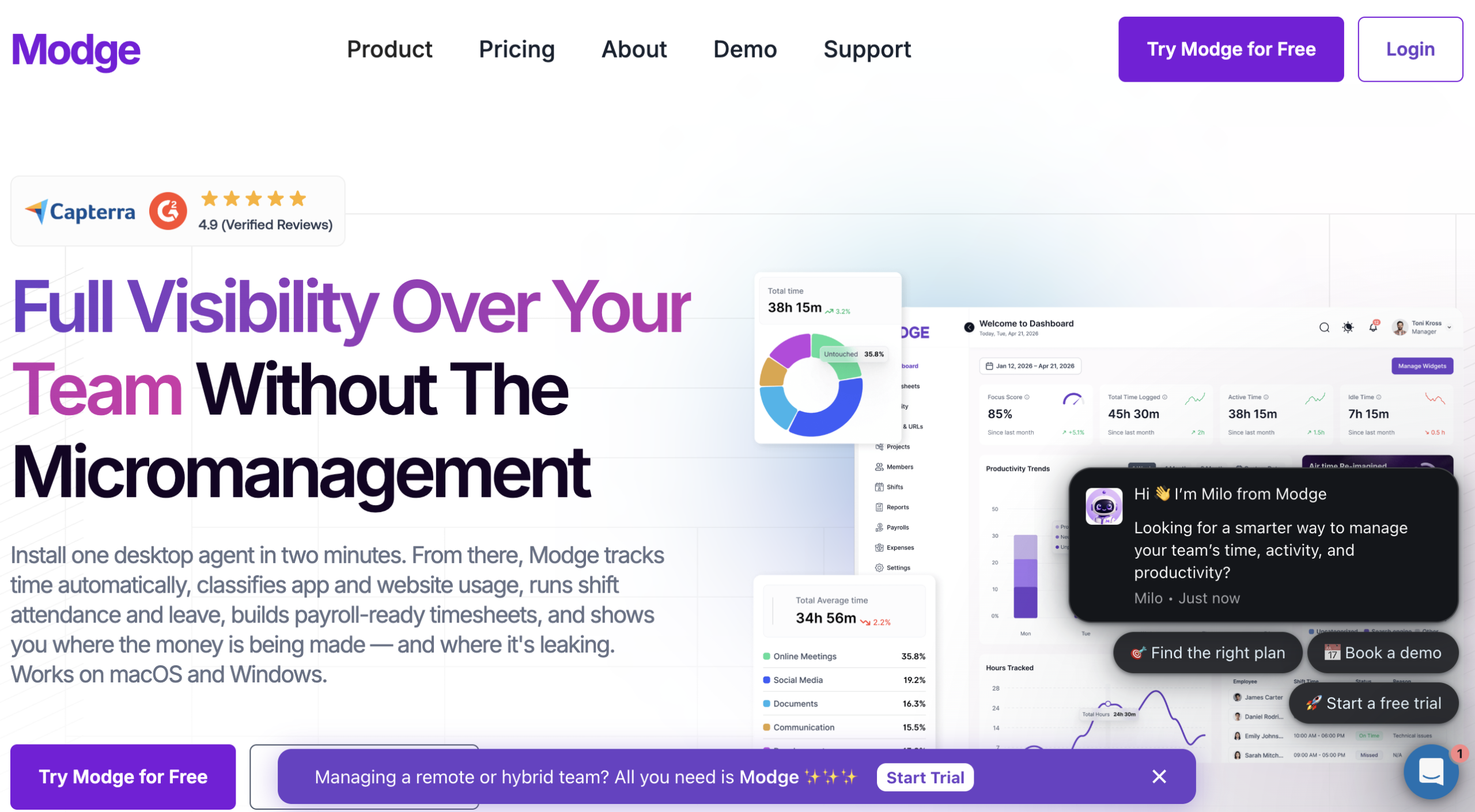
From our review, Modge combines automated time tracking, employee activity monitoring, AI-powered productivity insights, and workforce management into a single platform. The software is designed to capture work activity through a desktop application and transform that data into reports, timesheets, and analytics that help managers better understand team performance and make informed operational decisions.
Desktop App & Tracking
Getting started with Modge requires employees to install the desktop application on either macOS or Windows. After accepting the End User License Agreement and starting a tracking session, the software automatically records work time, captures screenshots, and monitors the applications and websites being used. It also tracks metrics such as active time, idle time, and productivity scores. One privacy-focused aspect worth noting is that Modge does not record keystrokes, microphone activity, or webcam footage, while screenshot blurring can be enabled when needed.
Screenshots & Monitoring
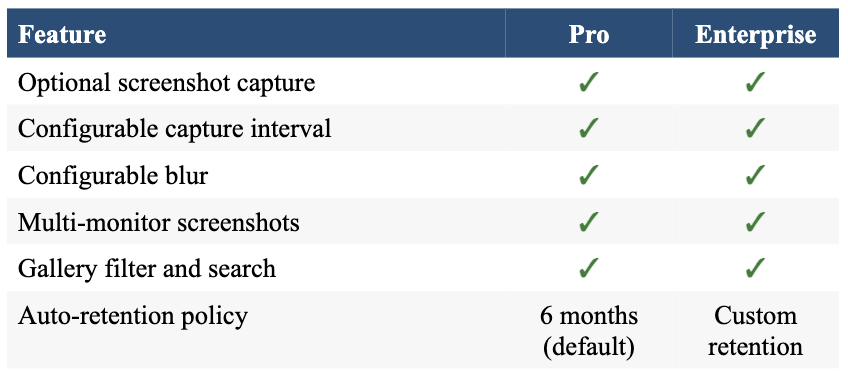
Screenshot monitoring is built into the platform and operates at regular intervals. On lower-tier plans, screenshots are typically captured every five minutes, while higher-tier plans allow the interval to be configured as frequently as once per minute. Alongside screenshots, Modge records application and URL usage, giving managers a clearer picture of how working hours are actually being spent.
Dashboard & User Roles
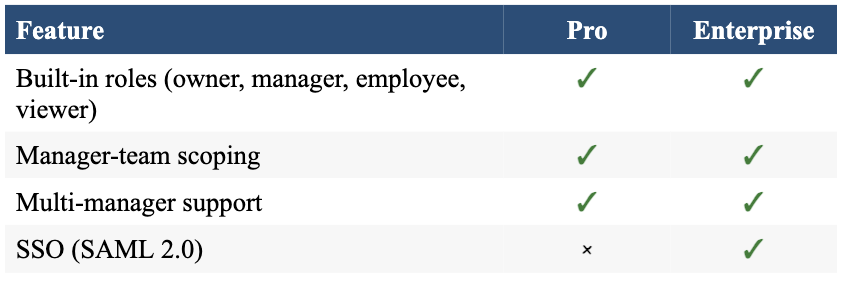
All tracked data is synchronized to a centralized web dashboard where access is determined by user roles. Owners receive complete administrative control over the platform, Managers can monitor their assigned teams, Members have access to their own tracked data and timesheets, and Viewers are provided with read-only access without requiring a paid user seat.
Timesheets & Approvals
The platform automatically generates timesheets for each pay period using the tracked work sessions. These timesheets can then be reviewed and approved through the built-in approval workflow. Leave management is also included, allowing organizations to manage employee time off alongside their tracked work hours.
Reports & Advanced Features
Every Modge plan includes access to essential reporting tools, such as Tracked Hours and App Usage reports. Higher-tier plans expand the feature set with workforce management capabilities including shift scheduling, schedule adherence tracking, payroll exports in CSV, Wise, and PayPal formats, client billing, profitability reporting, and API access for organizations that need deeper integrations.
Modge Services
Modge Services
Unlike companies that offer a wide range of outsourced business services, Modge focuses on three core product areas: Productivity Insights, Time Tracking, and Workforce Management. All three modules are powered by the same desktop agent, meaning the data captured during a work session is shared across productivity analytics, timesheets, payroll, and shift adherence reporting. This unified approach eliminates the need to collect the same data through multiple tools.
Productivity Insights
Productivity Insights serves as Modge’s primary analytics module, giving managers both real-time and historical visibility into how employees spend their workday. During our review, we found that the platform offers a live view showing each team member’s current application or website, active project, and real-time productivity score. Beyond live monitoring, the reporting dashboard presents productivity trends, application usage, and idle time across customizable date ranges.
Some of the key features available in this module include:
- Real-time visibility into each employee’s current application or website, assigned project, and live productivity score.
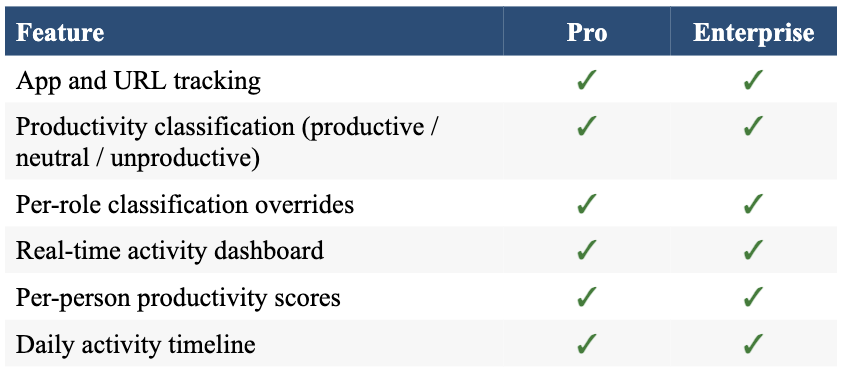
- App and URL tracking that automatically classifies software and websites as productive, neutral, or unproductive, with classification rules that can be customized by organization or job role.
- Daily, weekly, and monthly dashboards displaying productivity scores, activity timelines, and trend comparisons against previous reporting periods.
- Optional screenshot capture, which is disabled by default and can be configured for individual employees or teams, including adjustable capture intervals and privacy blur settings.
- AI-powered pattern detection that identifies idle time, extended focus sessions, frequent application switching, and potential workload or burnout indicators.
Time Tracking
Modge’s time tracking system runs through a lightweight desktop application available for both macOS and Windows. Rather than relying on employees to manually start timers or clock in and out, the platform records work sessions automatically, allowing tracked time to flow directly into reports and timesheets without additional input.
Key capabilities include:
- Automatic session tracking with idle detection to ensure tracked hours reflect actual work activity rather than inactive screen time.
- Auto-generated timesheets populated from tracked sessions, along with one-click approval for each pay period and support for manager comments when entries are rejected.
- Reporting tools covering tracked hours, project profitability, and a complete audit trail for every manually added or edited time entry.
- Offline tracking support, with recorded sessions automatically syncing once an internet connection is restored.
- Payroll-ready exports available in CSV formats, including Wise and PayPal-compatible files, as well as PDF reports.
Workforce Management
The Workforce Management module extends beyond time tracking by bringing scheduling, attendance, leave management, and payroll administration into a single system. Since these features rely on the same underlying tracking data, scheduled shifts, approved leave requests, and recorded work sessions remain synchronized without requiring separate tools.
Notable features include:
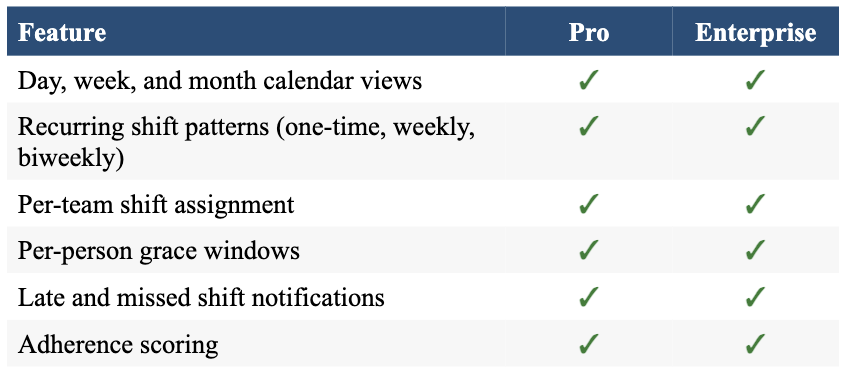
- Shift scheduling with one-time, weekly, and biweekly recurring patterns, along with reusable templates for recurring schedules.
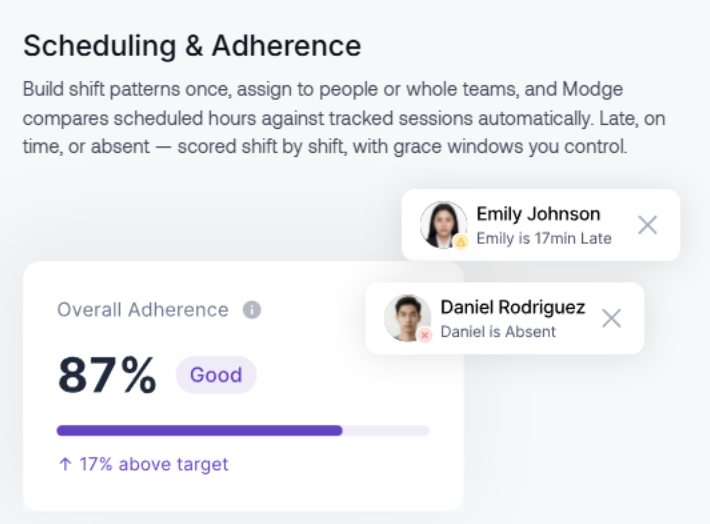
- Automatic attendance and schedule adherence scoring that compares tracked work sessions against planned shifts using configurable grace periods.
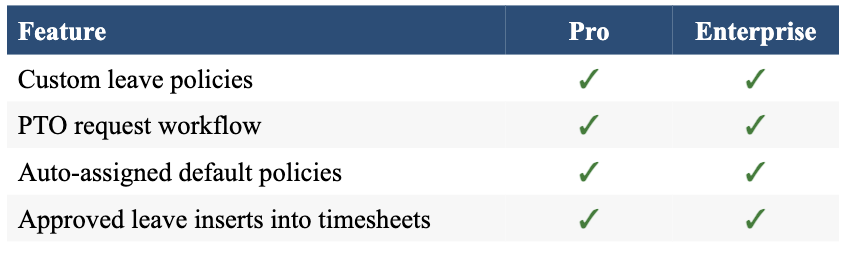
- Leave management with customizable leave policies, automatic policy assignment for new employees, and approved leave that is automatically reflected in employee timesheets.
- Real-time notifications for late arrivals, missed shifts, and employees approaching low leave balances.
- Payroll exports that reconcile approved work hours, paid leave, and billing or pay rates configured for individual employees, projects, or clients.
One observation from our review is that Modge does not position itself as an industry-specific solution. Instead, the platform appears to be designed for organizations across a wide range of industries, rather than focusing on verticals such as healthcare, legal services, or real estate.
Modge Plans & Pricing
Modge follows a straightforward per-seat pricing model with two plans: Pro and Enterprise. Both plans include a fully featured 14-day free trial without requiring a credit card, and subscriptions can be canceled at any time. Businesses that choose annual billing receive a 20% discount compared to paying month-to-month.
Pro Plan
The Pro plan is designed for growing teams that want comprehensive visibility into employee time, productivity, and work activity. Pricing starts at $7 per seat per month when billed monthly, or $5 per seat per month with annual billing.
During our review, we found that the Pro plan includes most of the features small and mid-sized businesses are likely to need. These include automatic and manual time tracking, app and URL monitoring with productivity classification, configurable idle detection, a real-time activity dashboard, optional screenshot capture with adjustable intervals and privacy blur, project tracking with billable hours and billing rates, automatically generated timesheets with manager approval workflows, flexible pay period options, shift scheduling with attendance and adherence tracking, custom leave and PTO management, payroll-ready CSV and PDF exports, and five built-in user roles with configurable permissions.
Enterprise Plan
The Enterprise plan is aimed at larger organizations that require more advanced administration, security, and deployment options. Unlike the Pro plan, Enterprise pricing is provided on a custom per-seat basis and is billed annually, so organizations must contact Modge’s sales team for a personalized quote.
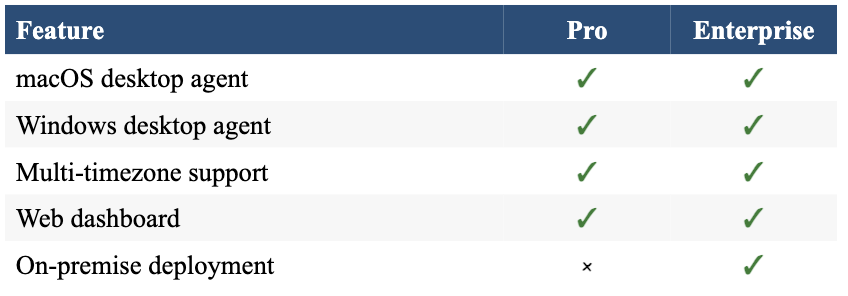
In addition to everything included in the Pro plan, the Enterprise tier adds license management, capacity analysis, insider threat detection, advanced reporting capabilities, Single Sign-On (SAML 2.0), audit logs, customized onboarding and support, and the option to deploy the platform on an organization’s own infrastructure. These additions make the Enterprise plan better suited for businesses with stricter security, compliance, and IT management requirements.
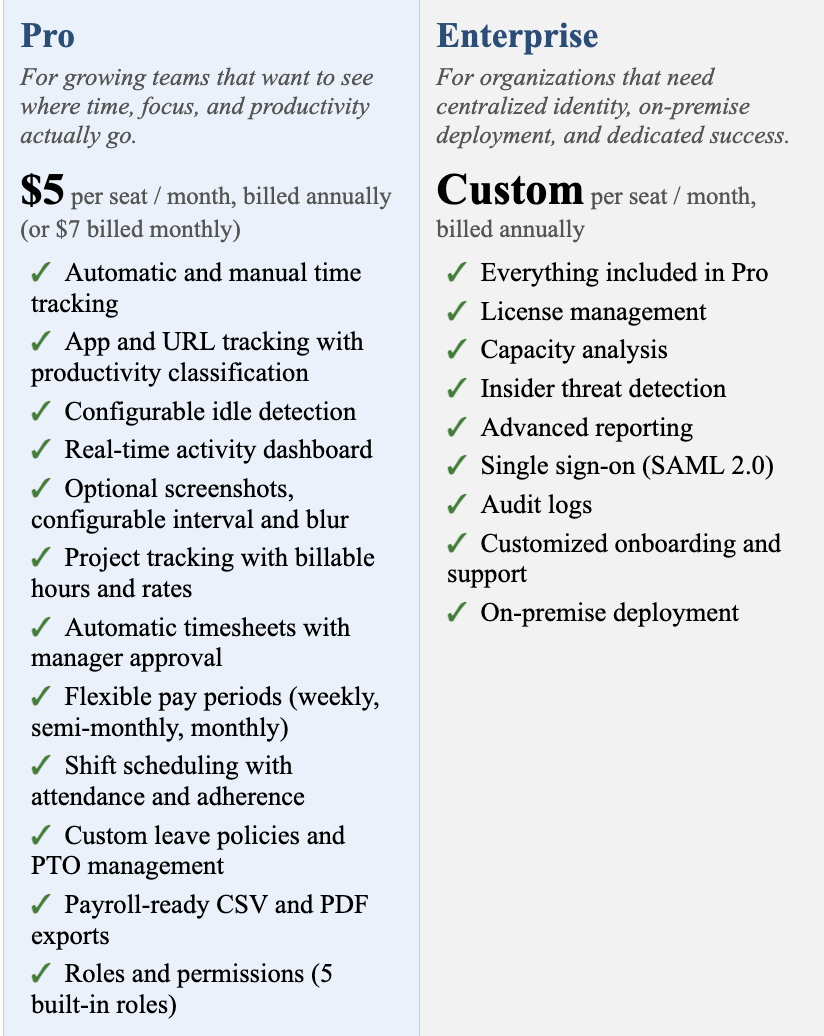
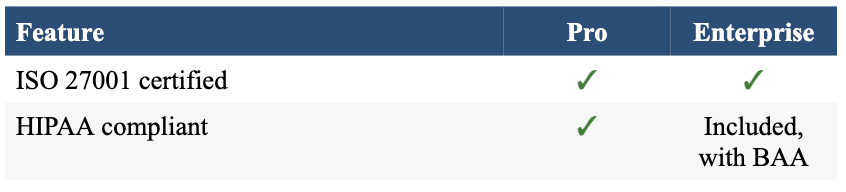
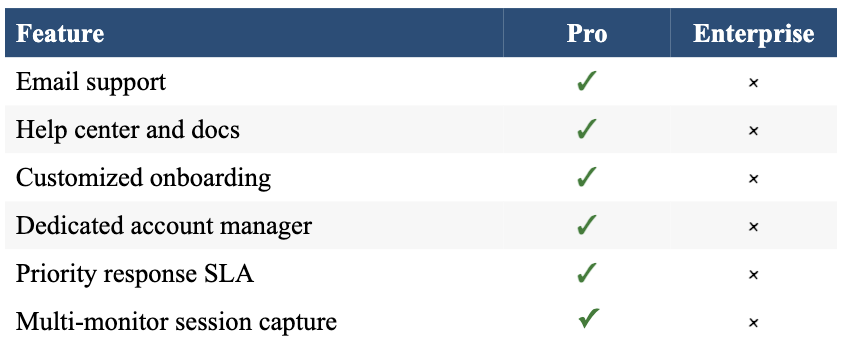
For a closer look at exactly what each tier unlocks, here’s the full feature breakdown by category, pulled directly from Modge’s plan comparison chart.
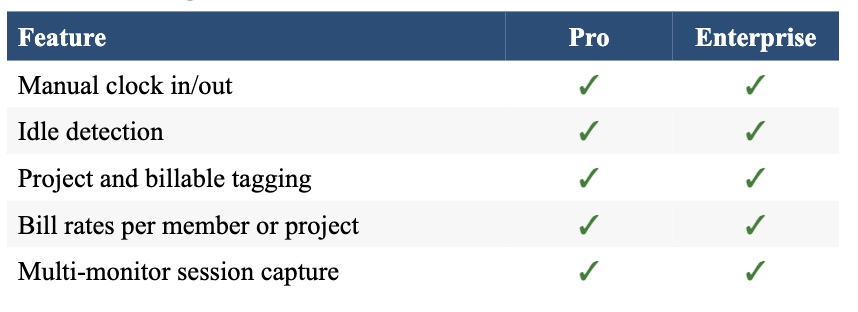
Time Tracking
Productivity & Activity
Screenshots
Shifts & Scheduling
Timesheets & Pay Periods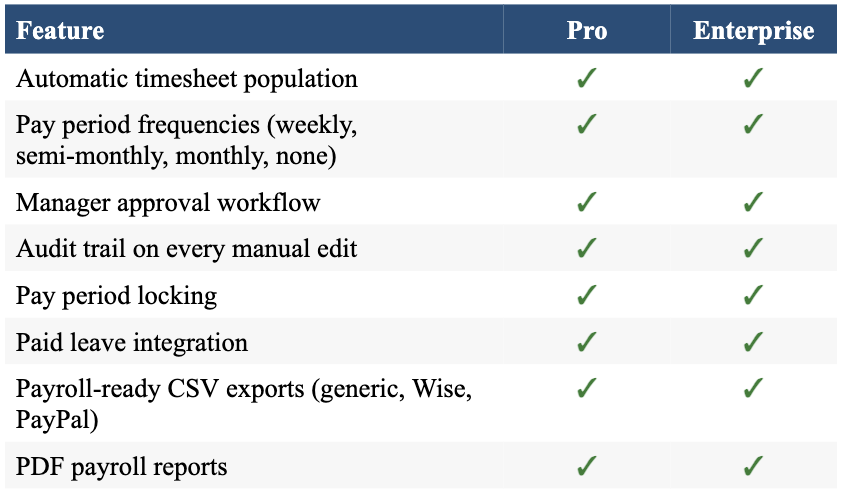
Reports & Exports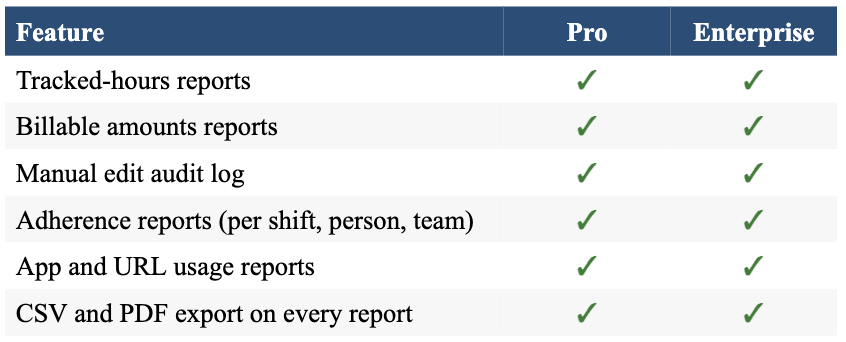
Leave Management
Roles & Permissions
Platform & Devices
Security & Compliance
 Support & Onboarding
You can get in touch with their sales team through modge.com for a custom Enterprise quote or a live demo.
Modge Testimonials
As a company that’s only been operating for about a year, they don’t yet have testimonials or reviews listed here. Once clients have had a chance to work with the platform, we’ll look forward to sharing their feedback in this section.
Modge Alternatives
Their primary competitors are Hubstaff, Time Doctor, and Apploye, all established names in the time tracking and workforce analytics space. Their pitch is that their software is more advanced and technical than the competition, delivering genuine insights rather than surface-level reporting, along with more competitive pricing and stronger customer support.
Since they’re still a young company, it’s worth comparing them directly against these more established platforms to see which best fits your team’s size, budget, and reporting needs before committing.
Your Turn
Have you worked with Modge? If so, please leave a review of your experience below to help others with their decision.
